Password Policy: The CNIL Rules to Apply in 2026
Since Deliberation No. 2022-100, which is still in force, the CNIL no longer sets a single length requirement. By default it asks for 80 bits of entropy, which means at least 12 characters of four types, 14 characters with no special characters, or a 7-word passphrase. It has also dropped mandatory periodic changes for standard user accounts, and it recommends a password manager plus multi-factor authentication for sensitive access. This guide turns those rules into a policy an SME can actually apply.
Key takeaways:
- By default, the CNIL requires 80 bits of entropy: 12 characters with uppercase, lowercase, digits and special characters, 14 characters with no special characters, or a 7-word passphrase.
- If the account limits login attempts (lockout after 10 failures, time delays, CAPTCHA), 50 bits are enough. That works out to about 8 characters of 3 different types.
- Forcing a password change every 90 days is no longer recommended for standard users. It is still required for administrator accounts.
- The CNIL recommends giving staff a password manager and training them to use it, with a particularly strong master password.
- On the server side, passwords must never be stored in plain text. Use a dedicated, salted hashing function such as Argon2 or scrypt, and never MD5 or SHA-1.
Table of Contents
- What does the CNIL recommend for a secure password?
- Do you still need to change your password every 90 days?
- What length for each account type: email, admin, card?
- How do you write a password policy for an SME?
- Why does the CNIL recommend a password manager?
- When should you add multi-factor authentication?
- How should passwords be stored on the server side?
- What should you do if your company suffers a password leak?
- Yundera: fewer scattered accounts, your data on your own server
- The most common password policy mistakes
- Sources
- Frequently Asked Questions
What does the CNIL recommend for a secure password?
When no other measure protects an account, the CNIL's default recommendation is a password with at least 80 bits of entropy. This threshold comes from Deliberation No. 2022-100 of July 21, 2022, which repealed the 2017 recommendation (CNIL, password recommendations). The key change is that the CNIL no longer sets a single minimum length. It measures strength instead.
Entropy measures how hard a password is to guess. It depends on two things: the number of possible characters and the length. Each extra character multiplies the number of combinations an attacker has to try. Three formats reach the 80-bit level:
- At least 12 characters: with uppercase, lowercase, digits and special characters, drawn from a set of at least 37 special characters.
- At least 14 characters: with uppercase, lowercase and digits, and no special characters required.
- A passphrase of at least 7 words: easier to remember at an equivalent strength.
So it's better to make a password longer than to make it more complicated. Swapping an a for an @ without adding characters does little. On the other hand, Hello12! mixes four character types and is still a weak password, as IT-Connect points out.
Pro tip: in your policy, state the 80-bit threshold and the three accepted formats, not a basic rule like “8 characters including one special character.”
Do you still need to change your password every 90 days?
No. For standard user accounts, the CNIL has dropped the requirement to renew passwords at regular intervals (CNIL, password recommendations). In practice, a forced change every quarter pushes people toward variations that are easy to guess, like Spring2026 followed by Summer2026. A long, unique password that you keep over time protects you better than a string of predictable ones.
Renewal is still needed in three cases, set out in the CNIL's Authenticating users guidance sheet:
- Administrator accounts: their passwords must be stronger and renewed on a regular, reasonable schedule.
- First login: a password assigned by an administrator or generated automatically must be changed the first time it is used.
- Suspected compromise: a data breach, an infected device, or a password typed into a fake website. Cybermalveillance.gouv.fr makes this its fifth best practice: change your password at the slightest suspicion.
For administrators, the CNIL also asks for a second authentication factor, as IT-Connect notes.
Pro tip: turn off automatic expiration for users, but spell out in your policy who triggers a forced change after an incident, and how quickly.
What length for each account type: email, admin, card?
The right length depends on what else protects the account besides the password. The CNIL distinguishes three cases, each with its own entropy threshold (CNIL, password recommendations). The more a service limits login attempts, the lower the threshold.
- Password only, 80 bits: for example, a forum or blog with no other protection. You need 12 characters of four types, 14 characters with no special characters, or a 7-word passphrase.
- Password with access restrictions, 50 bits: a webmail, an online shop or a company account that adds a delay after each failure, caps the number of attempts, uses a CAPTCHA or locks the account after 10 failures. The Authenticating users sheet gives the example of 8 characters of 3 different types.
- Password with a device held by the user, 13 bits: a bank card or phone PIN, with lockout after 3 failed attempts.
- Administrator accounts: they need higher entropy than user accounts, because they give access to the whole system.
- Email: Cybermalveillance.gouv.fr advises an especially strong password for your mailbox. Reset links for your other accounts usually go there, so whoever controls it can take over everything else.
Pro tip: only lower the threshold to 50 bits once you've confirmed that lockout or delays are actually turned on for the service. If they aren't, apply the 80 bits.
How do you write a password policy for an SME?
An effective SME password policy fits on one page and takes four steps to build, based on the rules in the CNIL's Authenticating users sheet.
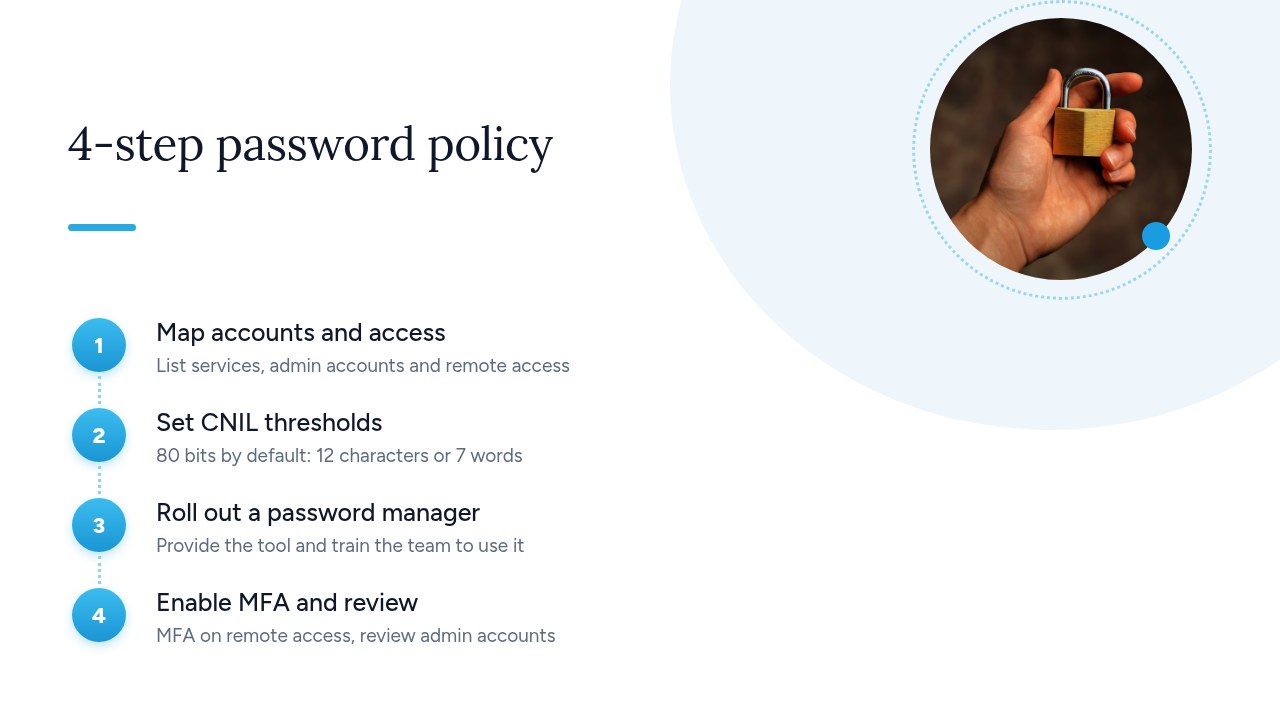
- Inventory accounts and access: list the services in use, the administrator accounts and everything that can be reached from outside the office.
- Set the CNIL thresholds: 80 bits by default, 50 bits if the service limits attempts, and higher entropy for administrators.
- Roll out a password manager: provide the tool and train the team to use it, as the CNIL recommends.
- Turn on MFA and review: the CNIL asks you to favor it, especially for connections from outside the network. Review administrator accounts at regular intervals.
Add the CNIL's identification rules:
- One unique login per person: every action must be traceable to someone.
- No shared accounts: the CNIL prohibits them.
- Generic accounts as a last resort: only when they can't be avoided, with management sign-off and traceability. Change their password as soon as someone no longer needs access.
Your one-page template can follow this outline: purpose and scope, thresholds by account type, mandatory tool, MFA rules, leak procedure and internal sanctions. Have every new hire sign it, or include it in your IT usage policy.
Pro tip: assign one person to the annual review. A policy with no owner stops being followed within a few months.
Why does the CNIL recommend a password manager?
The CNIL recommends a password manager because it's the only realistic way to have a long, different password for every service. Its Authenticating users sheet asks organizations to encourage their use and to train staff on them.
The first best practice from Cybermalveillance.gouv.fr is to use a different password for each service, so a breach on one site only exposes that account. Nobody can remember dozens of accounts with passwords of 12 characters or more. A password manager generates, stores and fills them in for you.
- Just one secret to remember: the master password, which the CNIL wants to be especially strong. A passphrase of 7 words or more works well.
- Randomly generated passwords: no predictable variations of one base password.
- Compatible forms: the CNIL lists blocking copy-paste or autofill as a practice to avoid when it stops people from using a password manager. Check your internal applications.
To pick a tool, see our comparisons Bitwarden vs 1Password and Vaultwarden vs Bitwarden.
Pro tip: turn on two-factor authentication for the password manager itself. It's the account that protects all the others.
When should you add multi-factor authentication?
Add multi-factor authentication wherever the service supports it, starting with anything that can be reached from outside your office. That's the rule in the CNIL's Authenticating users sheet, which asks organizations to favor MFA when a login can be reached from outside their network. Webmail, remote access, online tools and administrator accounts come first.
To count as MFA, you have to combine at least two factors from different categories. Two passwords aren't enough. The CNIL distinguishes three categories:
- Knowledge: something you know, such as a password or PIN.
- Possession: something you have, such as a phone, a security key or a card.
- Inherence: something you are, such as a fingerprint or facial recognition.
The CNIL clarified this framework in a dedicated MFA recommendation (Deliberation No. 2025-019 of March 20, 2025, published April 1, 2025). It flags three points of caution: one-time codes sent by SMS, the use of employees' personal phones as a possession factor, and the use of biometrics. So the choice of factor also has to be weighed against the GDPR.
To pick a method and roll it out, see our two-factor authentication guide for SMEs.
How should passwords be stored on the server side?
On the server side, a password must never be kept in plain text. Only its hash is stored, computed with a non-reversible function designed for passwords and combined with a salt or a key. The CNIL names Argon2 and scrypt among the suitable functions (CNIL, password recommendations). If the database is stolen, the attacker gets hashes, not the passwords themselves.
The Authenticating users sheet adds two prohibitions: the MD5 and SHA-1 functions, and default passwords. When a key is used, it must not be stored in the same database as the hashes.
A checklist to send to your IT provider or software vendor:
- Storage: are passwords hashed with Argon2, scrypt or an equivalent function, with a salt?
- Algorithms: are MD5, SHA-1 and plain-text storage ruled out everywhere, including backups and logs?
- Key: if a key is used, is it stored outside the hash database?
- Shipped accounts: are default passwords disabled, and must they be changed at first login?
- Attempts: is the number of attempts limited, with delays or lockout?
- Forms: do copy-paste and password managers work?
Pro tip: ask for written answers to this checklist and attach them to the contract. If there's a leak, you'll know right away whether the exposed passwords were protected.
What should you do if your company suffers a password leak?
If passwords leak, act in this order: secure the affected accounts, notify the CNIL within 72 hours if personal data is involved, then inform the people affected. The CNIL sets out the expected steps in its password recommendations:
- Notify the CNIL: the data breach must be reported within 72 hours.
- Force a change: require a new password at the next login for every affected account.
- Inform users: advise them to change that password on every service where they reused it. Attackers test stolen credentials on other sites.
The figures the CNIL cites show this scenario is nothing unusual:
- 81%: the share of breach notifications worldwide linked to password problems, according to a 2021 Verizon study.
- About 60%: the share of notifications the CNIL has received since early 2021 that involve hacking.
- 4% or €20 million: the maximum possible fine, expressed as a percentage of global annual turnover or as a fixed amount.
A password leak often opens the door to a bigger attack. Our article Ransomware in the workplace: what to do and how to protect yourself covers the rest of the incident response.
Pro tip: draft a message template for users now and decide who will notify the CNIL. The 72 hours go by fast during an incident.
Yundera: fewer scattered accounts, your data on your own server
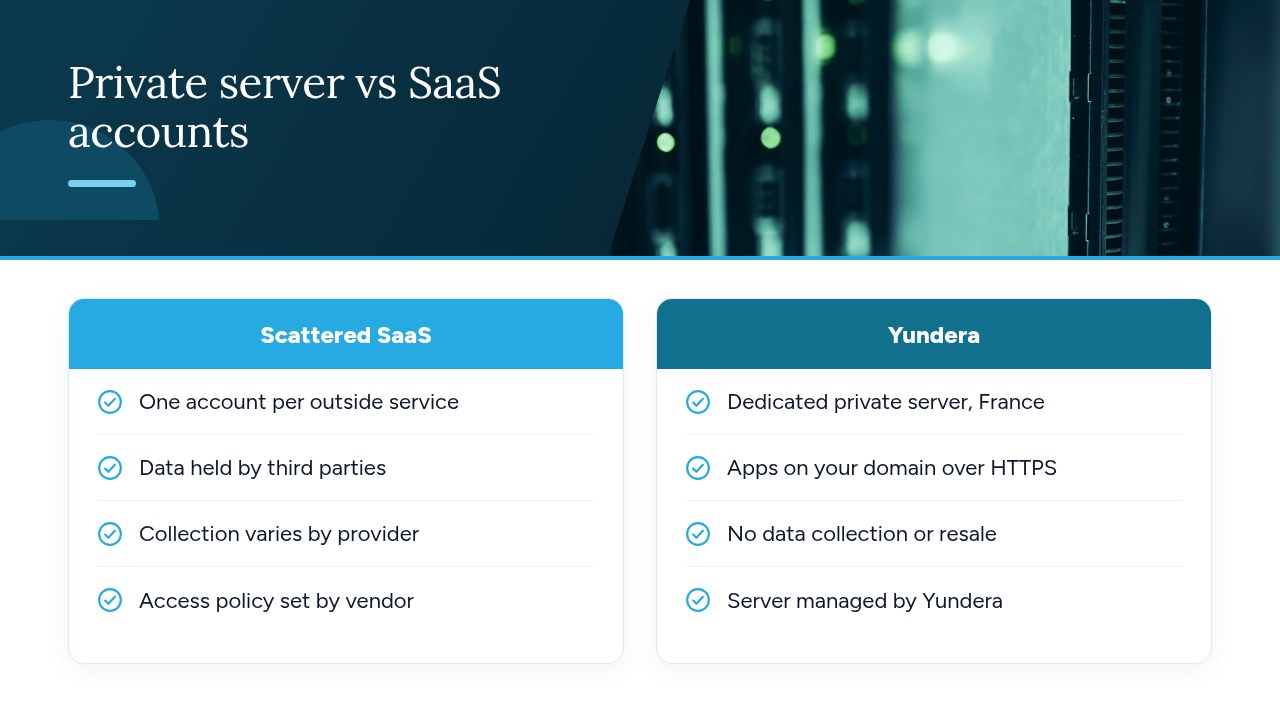
A password policy is easier to apply when a company's tools sit in one place than when they're spread across dozens of external services. Every SaaS provider has its own accounts, its own security rules and its own way of handling your data. The more services you use, the harder it gets to inventory access, check the CNIL thresholds and react quickly to a leak.
Yundera is one option for bringing these tools together. The company provides a managed private server, the Personal Cloud Server, hosted in France and dedicated to a single customer. Ready-to-use open source apps install in one click from an app store: file storage, photos, website hosting, office tools and more. Each app is reachable on your own domain over HTTPS, with no static IP, no port forwarding and no manual certificate setup. Your data stays on your server: Yundera doesn't collect it or sell it. You don't need any technical skills, because Yundera manages the server. The rules in this guide still apply to every account, and so does the advice in our two-factor authentication guide for SMEs.
To compare plans and pricing, visit the Yundera private servers page.
The most common password policy mistakes
Most common mistakes come from old rules that nobody has revisited since the 2022 CNIL recommendation:
- 90-day expiration for everyone: limit renewal to administrators and cases of compromise.
- Complexity without length: require 80 bits by default, meaning 12 characters or 7 words.
- Copy-paste blocked: password managers stop working.
- Shared accounts and default passwords: the CNIL prohibits them.
- Poorly protected email: it should have the strongest password of all.
- Administrators overlooked: plan for higher entropy, regular renewal and a second factor.
- No leak procedure: without one, the 72-hour deadline goes by fast.
The CNIL rules fit on one page and don't require a big budget. What matters is writing them down, giving your teams a password manager and checking once a year that the policy is actually being followed.
— Yundera
Sources
- Passwords: recommendations for staying in control of your security | CNIL
- Security: Authenticating users | CNIL
- Multi-factor authentication: the CNIL's recommendations for better data protection
- Why and how to manage your passwords properly | Cybermalveillance.gouv.fr
- Passwords: are you following the new CNIL recommendations? | IT-Connect
Frequently Asked Questions
What is the minimum password length according to the CNIL?
The CNIL no longer sets a single length. By default it requires 80 bits of entropy, which means 12 characters with uppercase, lowercase, digits and special characters, 14 characters with no special characters, or a 7-word passphrase. If the service limits login attempts (lockout, delays, CAPTCHA), the threshold drops to 50 bits, for example 8 characters of 3 different types.
Do you have to change your password every 3 months?
No. Since its 2022 recommendation, the CNIL has dropped periodic renewal for standard user accounts. Renewal is still required for administrator accounts, and a password must be changed immediately if a compromise is suspected.
Is a passphrase more secure than a complex password?
A passphrase of at least 7 words reaches the same 80-bit level as a 12-character password that mixes four character types. Its advantage is that it's easier to remember. That makes it a good choice for secrets you need to memorize, such as a password manager's master password.
Does a company have to give its employees a password manager?
It isn't a legal requirement, but the CNIL recommends encouraging the use of a password manager and training staff to use it. Without a tool, it's impossible to have a long, different password for every service, which is what Cybermalveillance.gouv.fr advises.
What does a company risk if it stores passwords in plain text?
The CNIL prohibits plain-text storage. The only acceptable approach is a salted hash computed with a suitable function such as Argon2 or scrypt. If there's a leak, every account is exposed at once, and the company faces fines of up to 4% of its global annual turnover or €20 million.
Password Policy: The CNIL Rules to Apply in 2026