iCloud Alternative: How to Leave Apple Without Losing Your Data

The best iCloud alternative is one that leaves you in control of the keys and makes it easy to leave. For most individuals and small organizations, that means a private server in France running open source apps for photos, files, contacts and calendars. To leave iCloud without losing anything, request a copy of your data from Apple, check the archive, import it into the new service, and only then cancel your plan.
Key takeaways:
- With Standard Data Protection, which is on by default, 15 categories of iCloud data are end-to-end encrypted. Apple holds the keys for the rest, including Photos, iCloud Drive and iCloud Backup.
- Advanced Data Protection raises that number to 25 categories, but it is optional, and Apple stopped offering it in the United Kingdom in February 2025.
- Apple's automatic photo transfer only sends a copy to Google Photos. It usually takes 3 to 7 days and can take up to 30 days.
- Once your Apple data archive is ready, you have 14 days to download it. After that, it is deleted.
- Keep your iCloud+ plan active until you have counted the photos, contacts and calendars imported into the new service.
Table of Contents
- Why look for an iCloud alternative in 2026?
- Is iCloud really end-to-end encrypted?
- What iCloud alternatives actually exist?
- How do you get all your iCloud data back?
- How do you transfer your iCloud photos without going through Google Photos?
- Can you keep automatic iPhone photo backup without iCloud?
- Contacts, calendars, notes: which formats to use when leaving Apple?
- How much does an iCloud alternative cost compared with iCloud+?
- Yundera: a private server in France to replace iCloud
- Leaving iCloud: the most common mistakes
- Sources
- Frequently Asked Questions
Why look for an iCloud alternative in 2026?
Three reasons come up most often: the price grows with your photo library, Apple holds the keys to much of your data by default, and getting out is harder than getting in.
- A cost that tracks your photos: in the eurozone, iCloud+ costs €0.99 per month for 50 GB, €2.99 for 200 GB and €9.99 for 2 TB. Once a family photo library goes past 2 TB, the next plan up (6 TB) costs €29.99 per month (Apple's official pricing).
- Keys managed by Apple: Standard Data Protection is the default setting. Only 15 categories of data are end-to-end encrypted under it. For the rest, the keys stay in Apple's data centers, which means Apple can decrypt that data (iCloud data security overview).
- A single ecosystem: Apple's tool for transferring your photos has only one destination, Google Photos (Apple Support). You simply move from one tech giant to another.
Advanced Data Protection partly addresses the second point, but it depends on the provider's goodwill. On Friday, February 21, 2025, following a request from the British government, Apple stopped offering this protection in the United Kingdom. Users who had already turned it on were only given a grace period (Consomac). A setting the provider can take away does not guarantee you control over your data.
Pro tip: before comparing offers, write down the actual size of your photo library and the number of people sharing the plan. These two figures determine the cost of iCloud and of any alternative.
Is iCloud really end-to-end encrypted?
Only partly: by default, iCloud end-to-end encrypts only some of your data. The rest is only end-to-end protected if you turn on Advanced Data Protection yourself. Apple describes two levels of protection in its iCloud data security overview:
- Standard Data Protection: this is the default setting for every account. 15 categories of data are end-to-end encrypted. For the others, the keys are stored in Apple's data centers, so Apple can decrypt that data if needed.
- Advanced Data Protection: this setting is optional and must be turned on. It raises the number of end-to-end encrypted categories to 25, including iCloud Backup, iCloud Drive, Photos, Notes and Reminders. The keys then exist only on your trusted devices.
In return, you alone are responsible for access. If you turn on Advanced Data Protection and then lose access to your account, Apple does not have the keys to help you recover it.
Even with Advanced Data Protection, three common uses are not end-to-end encrypted:
- Shared Albums: photos you share with family and friends remain readable by Apple.
- iWork collaboration: Pages, Numbers or Keynote documents edited by several people are not covered.
- Link sharing: content shared with “anyone with the link” is not covered either.
Pro tip: if Advanced Data Protection is turned on and you plan to leave iCloud, be aware that Apple blocks the export of photos and videos as long as it stays active (Apple Support). Plan to turn it off just before the transfer, not earlier.
What iCloud alternatives actually exist?
There are four families of iCloud alternatives. They differ in who holds the keys and in how much work they require from you.
- Another mainstream US cloud: this is the simplest option, since Apple's tool transfers your photos directly to Google Photos. But the underlying problem remains: another giant holds the keys, and one day you will have to leave it too.
- An encrypted European cloud: privacy is good and hosting is closer to home. On the other hand, you use the provider's proprietary apps, and your export options depend on them.
- A NAS at home: you control everything, with open source software such as Immich. Updates, remote access and off-site backup are your responsibility. Immich's documentation itself points out that stored photos must be backed up separately.
- A managed private server: you keep the same open source apps and a server dedicated to you alone, but operations are handled by a provider. Check where it is hosted and how to export your data.
To choose, ask yourself four questions:
- Photo volume: a few dozen gigabytes or several terabytes?
- Number of users: just you, your family or a small team?
- Technical skills: can you maintain a server and its backups over the long term?
- Access away from home: do you need to reach your files on the go, from any device?
How do you get all your iCloud data back?
To get all your iCloud data back, ask Apple for a copy of the data associated with your account. It is free and done through the privacy.apple.com portal. According to Apple Support, this copy can include everything you store in iCloud: contacts, calendars, notes, bookmarks, reminders, emails, photos, videos and documents.
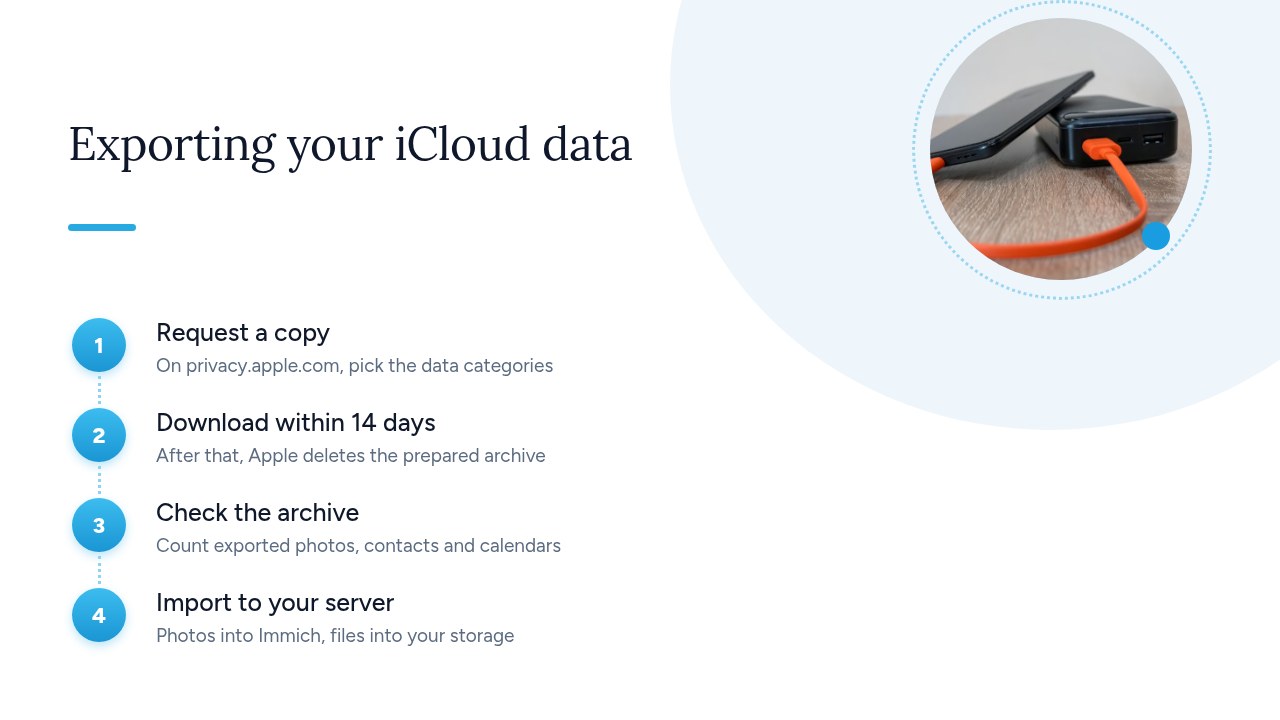
- Request the copy: sign in to the portal with your Apple Account, choose to get a copy of your data, then select the categories you want.
- Download within 14 days: Apple notifies you when the archive is ready. You then have 14 days to download it, after which it is deleted.
- Check the archive: before deleting anything, compare the number of exported photos, contacts and events with what your devices show.
- Import to your server: upload the photos to your photo library and the documents to your storage space. Keep the original archive until the import has been validated.
Only select the categories you need. Purchase history or app activity make the request heavier without adding anything to your migration. If your photo library is large, make one request for photos and a separate one for contacts, calendars and documents: each archive will be easier to download and check.
Pro tip: make sure you have enough disk space before submitting the request, and download the archive as soon as it arrives. The 14-day window goes by quickly, and an expired archive means requesting everything again.
How do you transfer your iCloud photos without going through Google Photos?
To transfer your photos without going through Google Photos, don't use Apple's transfer tool. Retrieve the original files yourself and import them directly into your own server. Apple's tool only sends a copy to Google Photos, with limitations spelled out by Apple Support:
- Timeframe: most transfers take 3 to 7 days, and some take up to 30 days.
- Requirements: two-factor authentication must be on and Advanced Data Protection must be off.
- What gets lost: Shared Albums, Smart Albums, Live Photos and some metadata are not transferred.
- Versions: only the most recently edited version of each photo is sent, not the original.
To keep your originals, you have two options:
- Apple's data copy: select the Photos category in your data copy request, then download the archives within 14 days.
- The Photos app on a Mac: in the Photos iCloud settings, turn on “Download Originals to this Mac”. Then select your photos and choose File > Export > “Export Unmodified Original”.
Then import these files into your self-hosted photo library, preserving their folder structure and dates.
Pro tip: export one year at a time and count the files after each import. If something goes wrong, you will know exactly which part of the library to redo.
Can you keep automatic iPhone photo backup without iCloud?
Yes. A self-hosted photo library such as Immich can replace iCloud Photos: its mobile app can automatically upload your iPhone photos to your server. Immich is open source software released under the GNU AGPL v3 license. The code is public, and no one can lock you into a proprietary version.
Day to day, it works much like iCloud Photos:
- Automatic upload: new photos and videos go to your server, not to a third-party cloud.
- Access from all your devices: you can browse the library in the mobile app or in a web browser.
- One server for the whole family: each member can have their own account and upload their photos to the same server.
Immich's documentation highlights one point not to overlook: the database only contains metadata and user information. The photos and videos themselves, stored in the folder set by UPLOAD_LOCATION, must be backed up separately. A photo server is therefore not a backup: you need a second copy, somewhere else.
To keep your memories readable and exportable over the long term, see also our guide Private photo album: guaranteeing export for 20 years.
Pro tip: leave iCloud Photos on until automatic backup to your server has run for several weeks without errors. Only turn it off on the iPhone after checking that both libraries contain the same number of photos.
Contacts, calendars, notes: which formats to use when leaving Apple?
To leave Apple, choose open formats that any software can read: vCard for contacts, iCalendar for calendars, and plain text or Markdown for notes. All three categories are included in the Apple data copy:
- Contacts as vCard (
.vcf): this is the standard address book format. A single file can hold all your contacts, with their phone numbers, addresses and photos. - Calendars as iCalendar (
.ics): each calendar is exported with its events and their recurrences. The file can be imported as is into any calendar app. - Notes as text or Markdown: check the format you receive in the archive and convert it if needed. A
.txtor.mdfile will still be readable in twenty years, whatever the app.
You don't have to change your habits. iOS natively supports CardDAV for contacts and CalDAV for calendars. Add your server in the iPhone settings: go to Contacts or Calendar, then Accounts, Add Account and Other. Apple's Contacts and Calendar apps keep working, but your data now syncs with your server instead of iCloud.
To learn more about managing your address book, see our guide Private cloud contacts: keeping ownership of your address book.
Pro tip: once the CardDAV account is added, turn off iCloud contact sync on the iPhone, and do the same for calendars with CalDAV. Otherwise, every contact and every event will show up twice.
How much does an iCloud alternative cost compared with iCloud+?
An iCloud alternative is only cheaper if you compare it at equal storage and number of users. As a baseline, use Apple's official pricing for the eurozone, VAT included:
- 50 GB: €0.99 per month.
- 200 GB: €2.99 per month, or €35.88 per year.
- 2 TB: €9.99 per month, or €119.88 per year.
- 6 TB: €29.99 per month, or €359.88 per year.
- 12 TB: €59.99 per month.
Each plan can be shared with up to five family members. The storage is shared, however: a single large photo library can push the whole household to the next tier. For a fair comparison, work out your current volume, add its expected growth over three years, then count how many people you need to serve.
For each option, also include the costs that don't show up in the advertised price:
- NAS at home: the cost of the unit and drives, electricity, drive replacements and, above all, the time spent on updates, remote access and off-site backup.
- Managed private server: a subscription that includes operations. Compare what each offer includes, for example on this plans and pricing page.
Pro tip: put a value on your time. If a NAS takes two hours a month, add that to its cost before deciding it is cheaper.
Yundera: a private server in France to replace iCloud
To replace iCloud without managing hardware, Yundera offers a managed private server, the Personal Cloud Server. It is hosted in France and dedicated to a single customer. From an app store, you install ready-to-use open source apps in one click: file storage, photos, office suite, website hosting and more. You get the main features of iCloud Drive and iCloud Photos on a server that serves only you. To compare this approach with other storage solutions, read our article Google Drive alternative: which sovereign options in 2026?
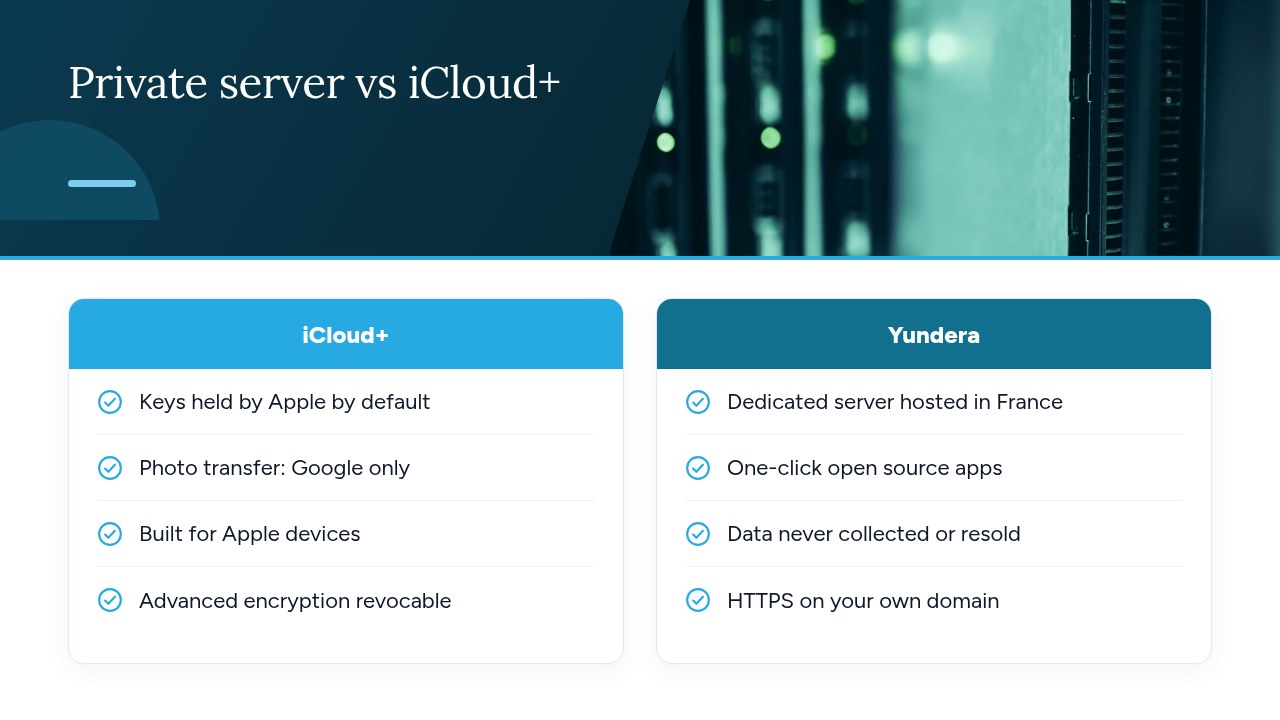
This model addresses two limitations of a home NAS mentioned above: remote access and maintenance. Each app is reachable on your own domain over HTTPS, with no static IP, no port forwarding and no certificates to configure yourself. Yundera manages the server, and no technical skills are required. Your data stays on your server: Yundera does not collect it or sell it. You can therefore follow the method described in this article, exporting your iCloud data, checking the archive and then importing it, without having to administer the machine that receives it.
To see the plans and pick the one that matches your data volume and number of users, visit the Yundera private servers page.
Leaving iCloud: the most common mistakes
Most data loss when leaving iCloud comes from a step done too early or a step forgotten. Cancelling iCloud+ before checking the import is the most costly mistake. The second is letting the 14 days pass during which the Apple archive can be downloaded. The transfer to Google Photos also catches many users out: it only sends the most recently edited version of each photo, leaves out Live Photos and Shared Albums, and won't start as long as Advanced Data Protection is on.
Two oversights come back to bite you later. First, your new server is not a backup: as the Immich documentation points out, the files must be copied separately. Second, contacts and calendars keep syncing with iCloud on every iPhone, iPad and Mac until you switch each device over to CardDAV and CalDAV. Work through the steps in order (export, check, sync, then cancel) and you will leave iCloud without losing anything.
— Yundera
Sources
- iCloud+ plans and pricing - Apple Support (FR)
- iCloud data security overview - Apple Support (FR)
- Transfer a copy of your iCloud photos to another service - Apple Support (FR)
- Get a copy of the data associated with your Apple Account - Apple Support (FR)
- iCloud: Apple disables Advanced Data Protection in the United Kingdom
- Quick start | Immich
Frequently Asked Questions
What is the best iCloud alternative for an iPhone?
The best alternative is one that leaves you the keys and an easy way out: a private server with an open source photo library such as Immich, plus contacts and calendars synced over CardDAV and CalDAV. The iPhone supports both protocols natively, so Apple's Contacts and Calendar apps keep working. Choose between a home NAS and a managed private server based on your photo volume, the number of users and the time you can spend on maintenance.
How do I move all my iCloud photos to another service?
Request a copy of your Apple data with the Photos category selected, or export the unmodified originals from the Photos app on a Mac, then import them into your new service. Apple's automatic transfer tool only sends a copy to Google Photos. It doesn't transfer Live Photos or Shared Albums, and only the most recently edited version of each photo is sent.
What happens if I cancel my iCloud+ subscription?
You lose the paid storage of your iCloud+ plan, as well as Family Sharing. If your data exceeds the remaining free storage, new photos and backups stop syncing. So only cancel after exporting your data and checking that it is complete on the new service.
Is iCloud GDPR-compliant and end-to-end encrypted?
Apple lets residents of the European Union exercise their rights, for example by requesting a copy of their data. End-to-end encryption, however, remains partial: with Standard Data Protection, which is on by default, only 15 categories of data are end-to-end encrypted. The optional Advanced Data Protection covers 25, but Shared Albums and public links don't benefit from it.
Can you back up your iPhone automatically without iCloud?
For photos and videos, yes: the mobile app of a self-hosted photo library such as Immich can upload them automatically to your server. Contacts and calendars sync with your server separately over CardDAV and CalDAV. For a full device backup, you can still use a computer. In every case, keep a second copy of your files on another storage medium.
iCloud Alternative: How to Leave Apple Without Losing Your Data