Want to add more Apps ?
You are in the right place. Yundera apps are installed through AppStores.
But not all AppStores work perfectly. The official Appstore, that you have when opening the Appstore, follow one strict rule : We only provide apps that work without issues. This means, the apps are reviewed and validated by our team, and the goal is simple : when you click install, it should work.
The most famous Open Source Apps are the following :
|
Website |
WordPress, Odoo |
|
VPN |
Wireguard |
|
Drive / Teams |
NextCloud |
|
Local AI - Not yet ready ! |
Mistral, Llama, Deepseek |
|
PDF / Convert |
Plex/Jelllyfin |
|
Password Manager |
Bitwarden / Vaultwarden |
|
Movies/Films |
Jellyfin/Plex/Stremio |
|
Cloud/Files |
Nextcloud / Seafile |
|
Cooking Recipes |
Mealie |
|
Tools |
N8N, OpenClaw |
We do not have yet all of these apps published in the main store. That's why we made the experimental AppStore, so you can have them all.
Discover experimental AppStores
These AppStores provide many more applications than Yundera official AppStore. However you have to note:
- Some apps are experimental
- Some apps are outdated
- Some apps do not start
- Some apps have never been validated
These AppStores are useful only if:
- You are comfortable troubleshooting
-
You accept broken or unfinished apps
Yundera does not include those apps by default to avoid frustration for users.
The first experimental Appstore we provide is YunderaLab.
👉 Experimental AppStore (YunderaLab)
⚠️ Use YunderaLab only if you fully accept the previous risks listed
To add it, go into your server AppStore, and go on the top right side. You can see the number of app. If you click on it, a dropdown button with "More apps" will be here. Click on it.
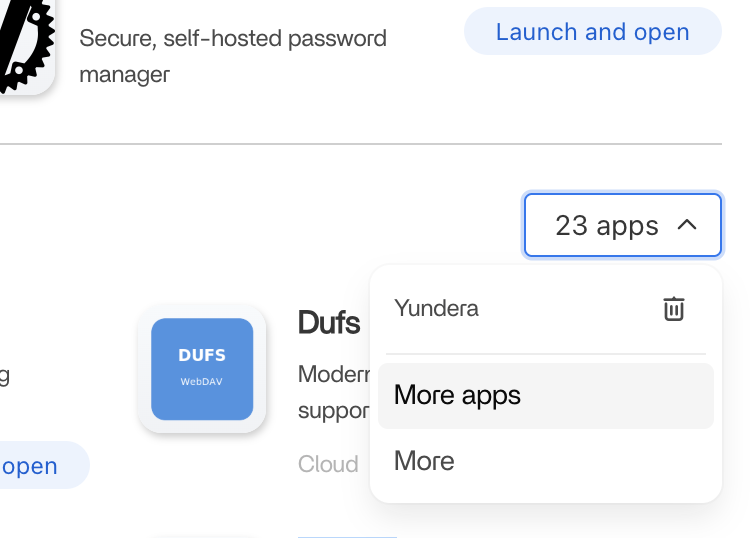
Then you can copy paste the experimental store inside that area :
https://github.com/Yundera/AppStoreLab/archive/refs/heads/main.zip
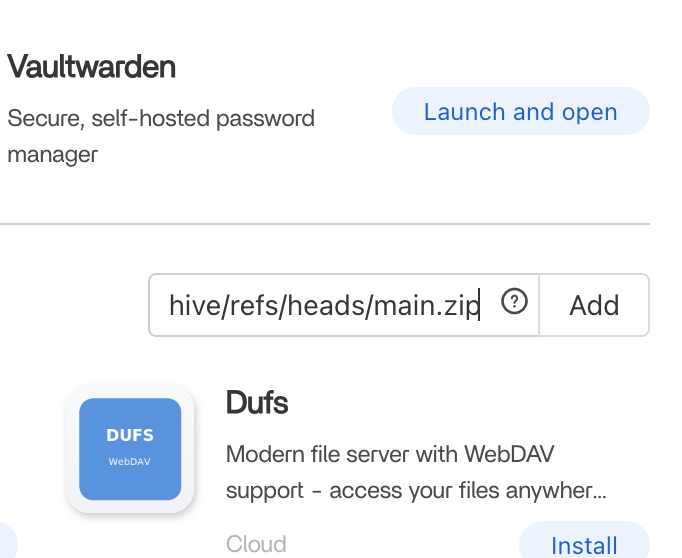
Once added, the Appstore will reload, and you will be able to have more apps inside your server!
Quick Comparison
| Yundera Official Appstore (Default) | YunderaLab Experimental Appstore | |
|---|---|---|
| Works in one click | ✅ | ⚠️ |
| Validated by Yundera | ✅ | ❌ |
| Beginner-friendly | ✅ | ❌ |
| Experimental apps | ❌ | ✅ |
| May require manual fixes | ❌ | ✅ |
Want to Add a New App to Yundera?
If you are a developer and want to add a new app to the Yundera AppStore, contributions are welcome. We also have a creator program where we can financially support our creators.
We only accept apps that:
- Follow our official standards
- Install and run correctly
- Require no manual intervention
- Are documented and maintainable
📘 Contribution guide
👉 https://github.com/Yundera/AppStore/blob/main/CONTRIBUTING.md
Which App Store Should You Use?
- If you want safe and reliable apps → Yundera Official AppStore
- If you want to experiment and test → YunderaLab
- If this server is for work or production → Yundera Official AppStore only
You searched for “add new app”.
Now you know the safest way to do it on Yundera.
Add more apps to your Yundera server (PCS)