Secure Remote Cloud Access: The Method That Protects Your Data
Go with a Zero Trust architecture (ZTNA) paired with strong encryption and a managed hosting provider that guarantees you can export your data. It's the most dependable combination for secure remote cloud access, whether you're an individual, a freelancer or a small business.
- The numbers: moving from a traditional VPN to a ZTNA architecture can cut remote-access support tickets by 80%.
- The core principle: ZTNA verifies every request (identity, device, context) instead of opening up broad network access the way a traditional VPN does.
- Check before you commit: always ask where your data is hosted and whether you can export it freely before signing with a cloud provider.
Key Takeaways
Secure remote cloud access combines a Zero Trust architecture, encryption across the board, and a contractual guarantee that you can export your data.
| Point | Details |
|---|---|
| Adopt ZTNA | Replacing the VPN with continuous identity verification cuts support tickets by 80%. |
| Encrypt everything | Apply TLS in transit and AES-256 at rest, with keys you genuinely control. |
| Verify data export | Insist on a live demonstration of how you'd retrieve your files before signing anything. |
| Save private links for critical needs | Cloud Connect makes sense for heavy professional use, not for everyday use. |
| Choose managed sovereign hosting | Yundera hosts in France, guarantees data export and manages the infrastructure with no technical skills required. |
Table of Contents
- The technical pillars of secure remote cloud access
- ZTNA or VPN: which one should you choose?
- Should you keep sensitive data off the public internet?
- How to choose a provider for reliable secure remote access
- How to roll out secure remote access step by step
- What most remote access guides leave out
- Yundera, a practical way to stay in control of your data
- Sources
The technical pillars of secure remote cloud access
Secure remote cloud access rests on four technical pillars. Ignoring any of them, even partially, is like leaving a door ajar.
- Multi-factor authentication (MFA) limits identity theft by requiring a second factor (an authenticator app, a physical key or biometrics) on top of the password. A stolen password alone is no longer enough to open a session.
- Encryption protects data at two distinct moments: in transit, via TLS, to secure the exchange between your device and the server; and at rest, usually with AES-256, to protect stored files. Encryption key management must stay under your control or that of a trusted provider — never diluted into an opaque infrastructure.
- IAM and RBAC (identity management and role-based access control) segment permissions: each user only reaches the resources they actually need, which limits the damage if an account is compromised.
- Device posture and SSO round out the setup. Checking that a device is up to date and uncompromised before letting it connect reduces the risk of an intrusion through a vulnerable machine, while single sign-on keeps things simple for users without sacrificing security.
Securing remote access depends on exactly this combination: strong authentication, encryption everywhere and granular permissions.
Pro tip: Turn on MFA for every account before you worry about anything else. It's the cheapest and most effective measure against intrusions.
ZTNA or VPN: which one should you choose?
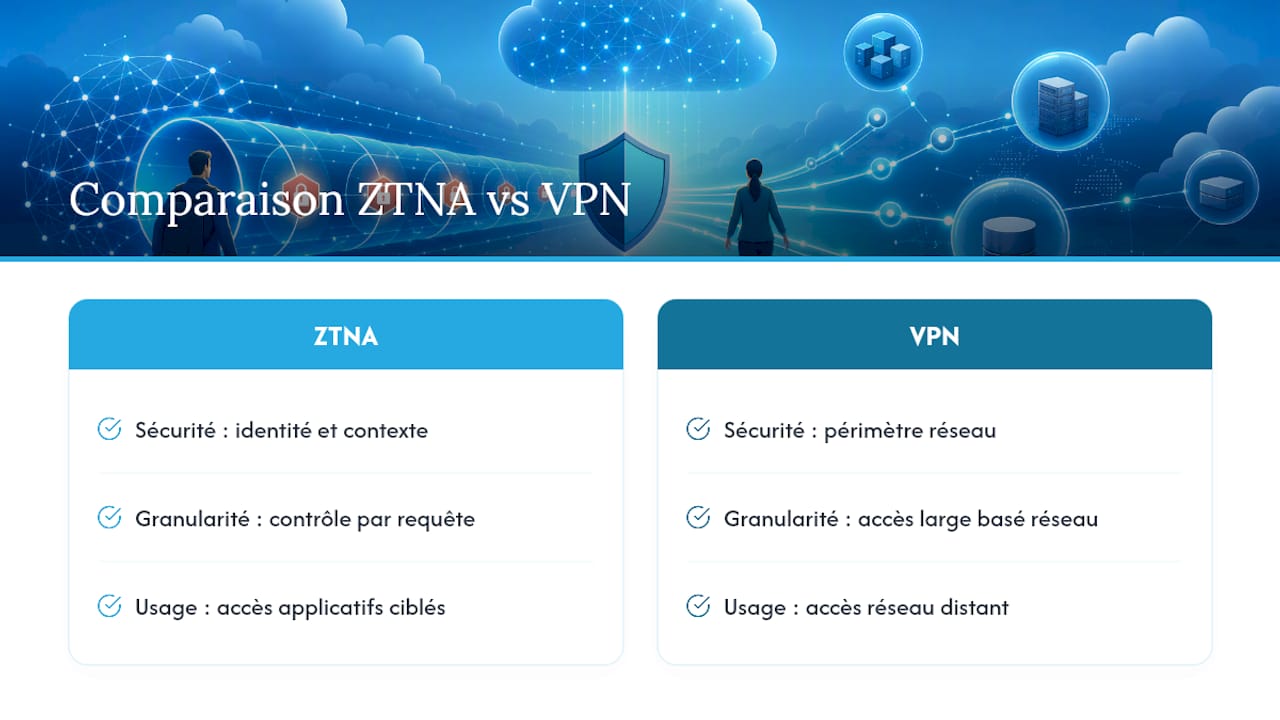
A traditional VPN opens a tunnel into the entire network once the connection is up. ZTNA does the opposite: deny by default, then continuously verify identity, device and context for each application, on every request.
That difference in philosophy changes everything in practice:
- Attack surface: a compromised VPN potentially exposes the whole network; ZTNA grants access application by application, which slows an attacker's lateral movement.
- User experience: ZTNA cuts remote-access support tickets by 80% compared with a VPN, largely because it eliminates the dropped connections and network configuration conflicts that come with VPNs.
- Sovereignty: ZTNA gives you finer control over who touches which data — a direct advantage when you need to document GDPR compliance.
For personal use or a very small organisation, a VPN still has occasional value. But as soon as several users are reaching sensitive resources, the Zero Trust model becomes the benchmark.
Should you keep sensitive data off the public internet?
Some situations call for more than an encrypted tunnel over the public internet: a business handling sensitive data continuously, or an organisation bound by strict contractual availability requirements. That's where private connections — also called dedicated links or Cloud Connect — come in.
These links establish a direct connection between your network and the cloud infrastructure, without ever crossing the public internet. The benefits are tangible:
- Stronger security: Cloud Connect links avoid exposure to the threats circulating on the public network and mechanically reduce the attack surface.
- Stable performance: lower latency and guaranteed bandwidth, useful for business applications that are sensitive to response times.
- Contractual commitment: these offerings usually come with an SLA (service level agreement) that binds the provider on availability.
The flip side is cost and implementation complexity. A dedicated link means an extra subscription, sometimes a technical installation, and a longer contractual commitment than a straightforward encrypted connection. For an individual or a small organisation, solid encryption combined with a ZTNA architecture is enough most of the time. A private link becomes relevant once your activity depends on permanent, reliable access to large volumes of data, or when your industry's regulations require it.
How to choose a provider for reliable secure remote access
Before committing to a provider, work through a concrete checklist. It'll save you from nasty surprises once your data has already been migrated.
- Data location and export: where is your data physically stored, and can you retrieve all of it at any time, in a usable format, with no hidden fees?
- Encryption and key management: does the provider encrypt your data at rest and in transit? Who holds the encryption keys, and can you revoke them?
- MFA, SSO and RBAC: are these features included natively, or do you have to bolt them on with paid third-party tools?
- Logging and audits: does the provider keep access logs you can consult after an incident, and does it run regular audits?
- Support and SLA: what's the response time in the event of an outage or a security incident? Are backups automatic and tested?
- Real cost: beyond the advertised price, check the fees for additional storage, data transfer and managed options that often get added after you sign up.
A private cloud gives you more control, but it demands genuine operational capacity: active encryption, continuous monitoring and regular audits. A managed provider that takes those tasks off your hands saves you a considerable amount of time.
Pro tip: Always ask for a data export demo before signing. A provider that hesitates to show you how to get your files back isn't the right partner.
How to roll out secure remote access step by step
Securing access to your data doesn't require a complete overhaul overnight. Here's a realistic progression, even without a dedicated IT team.
- Take inventory of your critical applications and data. Identify what needs protecting first: financial documents, family photos, collaborative work tools.
- Enable MFA and SSO, then set minimal ZTNA rules on your priority applications. Start small, with the most exposed accounts.
- Test with a small group before rolling out to everyone. Watch the connection logs and any incidents reported during this pilot phase.
- Expand gradually, automate security updates and schedule a regular review of access rights, at least once a year.
This step-by-step approach limits friction for users while building a solid foundation. A well-designed secure cloud connection from the start avoids expensive fixes later on.
What most remote access guides leave out
Most articles on this subject treat ZTNA as a simple technical upgrade to the VPN. That's the wrong framing. The real shift is that security stops resting on the network perimeter and starts resting on the identity and context of each request. Once you've grasped that, the VPN question becomes almost secondary.
What those guides also underestimate is how much sovereignty weighs in the equation. Encrypting your data isn't enough if the provider can mine it, resell it, or if exporting turns into an obstacle course when the contract ends. The real question isn't just “is my data protected?” but “can I get all of it back tomorrow, without depending on a provider's goodwill?”.
So for an individual or a small organisation, the priority isn't to build everything yourself. It's to pick a partner that already applies these principles, with locally hosted infrastructure and a clear contract on data export.
— Yundera
Yundera, a practical way to stay in control of your data
Yundera offers a fully managed private cloud server, hosted in France, designed for people who want secure remote access without giving up control of their data.
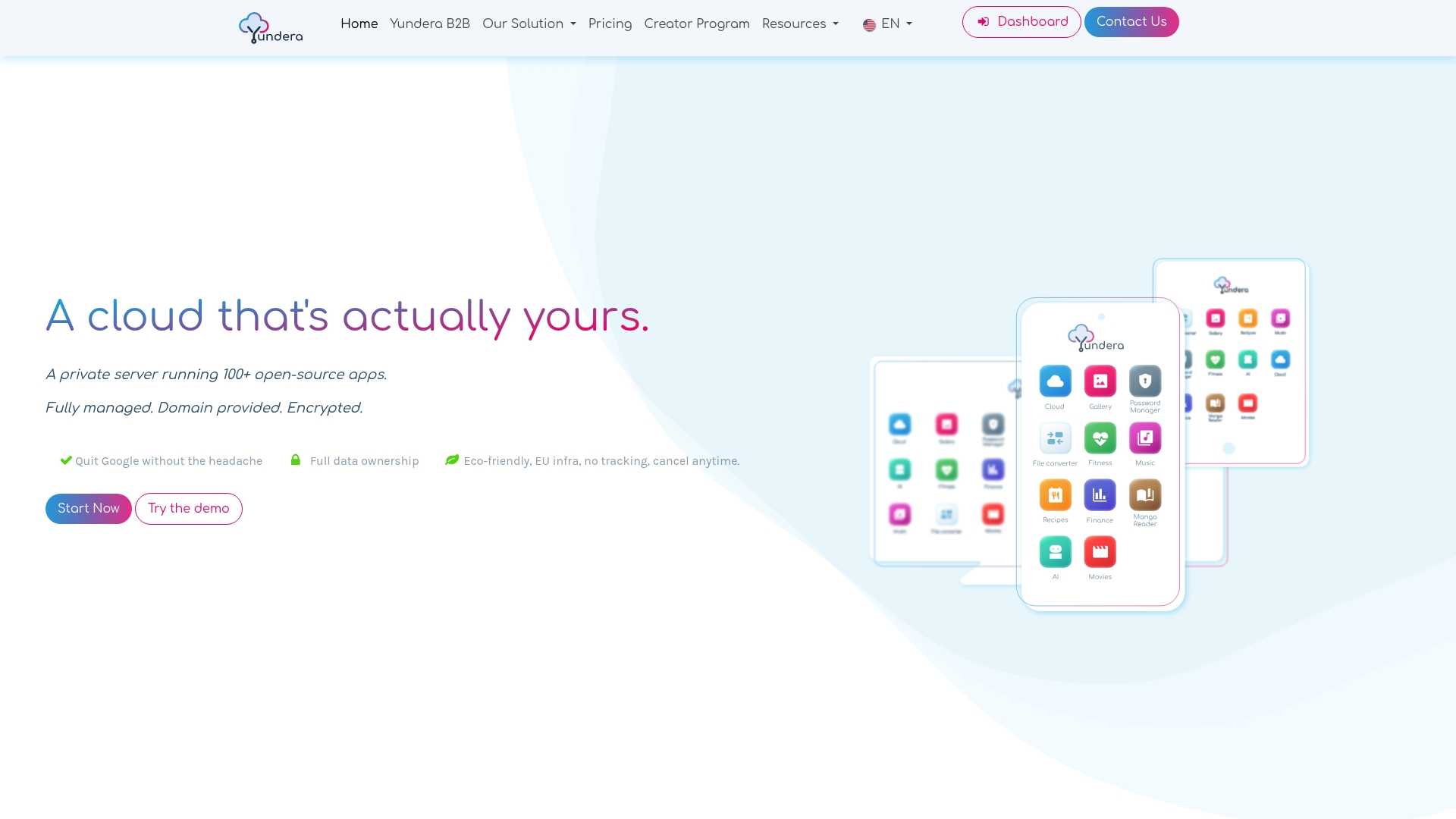
The infrastructure comes with a clear commitment: no data is collected or resold, and you can export all of your files at any time. More than 100 open source applications come preinstalled — from file sharing to streaming to team collaboration — all reachable from your own domain name, with no technical skills needed for installation or maintenance. Whether you're a privacy-conscious individual, an SME looking for a sovereign cloud solution or a freelancer handling sensitive data, Yundera's ethical infrastructure meets the criteria set out above directly: local hosting, encryption and full control over your information.
Take a look at the plans and pricing or check out the page for privacy-conscious users to get your own private server started.
Sources
- What is a remote access VPN? | NordVPN
- Cloud Connect: direct access to cloud services | Bouygues Telecom Business
- Cloud security: is your cloud environment secure? | Eurofiber
Secure Remote Cloud Access: The Method That Protects Your Data