Private Cloud Migration: A Guide for CIOs and Decision-Makers

Some workloads are stable, some handle sensitive data, and some cost a lot in data transfer fees. For these, a private cloud offers three things the public cloud can't always promise: sovereignty, predictable costs and steady performance. A sound migration has four steps. First, audit your workloads. Next, run a small pilot. Then migrate in batches. Finally, run the new environment with proper tooling, including monitoring and FinOps governance.
Key takeaways:
- Moving to a private cloud makes the most sense for workloads that are stable, sensitive or expensive in data transfer. Run an audit first to limit the risks.
- How you migrate depends on how much risk you can accept. The options range from moving apps as they are (rehost) to rebuilding them completely (refactor).
- During the migration, security requires encryption, network segmentation, zero trust and strict controls, so you stay compliant and keep a full audit trail.
- After the migration, you need ongoing monitoring, regular testing and FinOps discipline to keep costs from spiraling.
- With a managed offering like Yundera, SMBs and freelancers get a secure, flexible private cloud without hiring a dedicated team. The process starts with an audit and a small pilot.
Table of Contents
- Private cloud vs. public cloud: what are the real differences?
- Why are companies moving workloads back to private infrastructure?
- How should you audit your infrastructure before migrating?
- Rehost, replatform or refactor: which migration strategy should you choose?
- Replication, snapshots or sync: how do you migrate data without losing any?
- How do you stay secure and compliant during the migration?
- How should you run a private cloud after the migration?
- How a managed offering like Yundera helps your migration succeed
- Outlook: what rules of thumb should guide your decision today?
- Getting started with a managed private cloud migration
- Sources
- Frequently Asked Questions
Private cloud vs. public cloud: what are the real differences?
A private cloud is infrastructure used by a single organization. It can be hosted on-premises, in a provider's colocation facility, or run as a fully managed service by a third party. Unlike in the public cloud, its resources are never shared with other customers. That makes a big difference for network control, where your data is stored and how you are billed.
In practice, the main differences come down to how billing works and who is responsible for what. The public cloud charges for what you use and shares its infrastructure across thousands of customers. A private cloud server keeps your resources isolated, and its costs stay more stable over time.
Some workloads are especially well suited to a private cloud:
- databases with steady, predictable loads, which gain nothing from public cloud elasticity;
- large storage volumes that must be kept for a long time;
- AI processing on sensitive data that runs locally instead of through external APIs;
- applications that must keep data in specific locations by law.
Why are companies moving workloads back to private infrastructure?
Digital sovereignty is no longer just about compliance. It has become a strategic way to reduce dependence on providers based outside Europe. This directly affects contract negotiations and long-term budget control.
Three kinds of reasons come up again and again in migration decisions:
- Sovereignty and compliance: GDPR, the NIS2 directive and the French HDS certification for health data all require guarantees on where data is stored and how it can be traced. Some public cloud contracts don't cover these out of the box.
- The FinOps case: over 3 to 5 years, total cost of ownership (TCO) often favors private infrastructure once storage volumes and data egress fees become a regular cost.
- Priority use cases: databases with constant loads, large volumes of frequently accessed (hot) storage, and local AI models trained or run on confidential data.
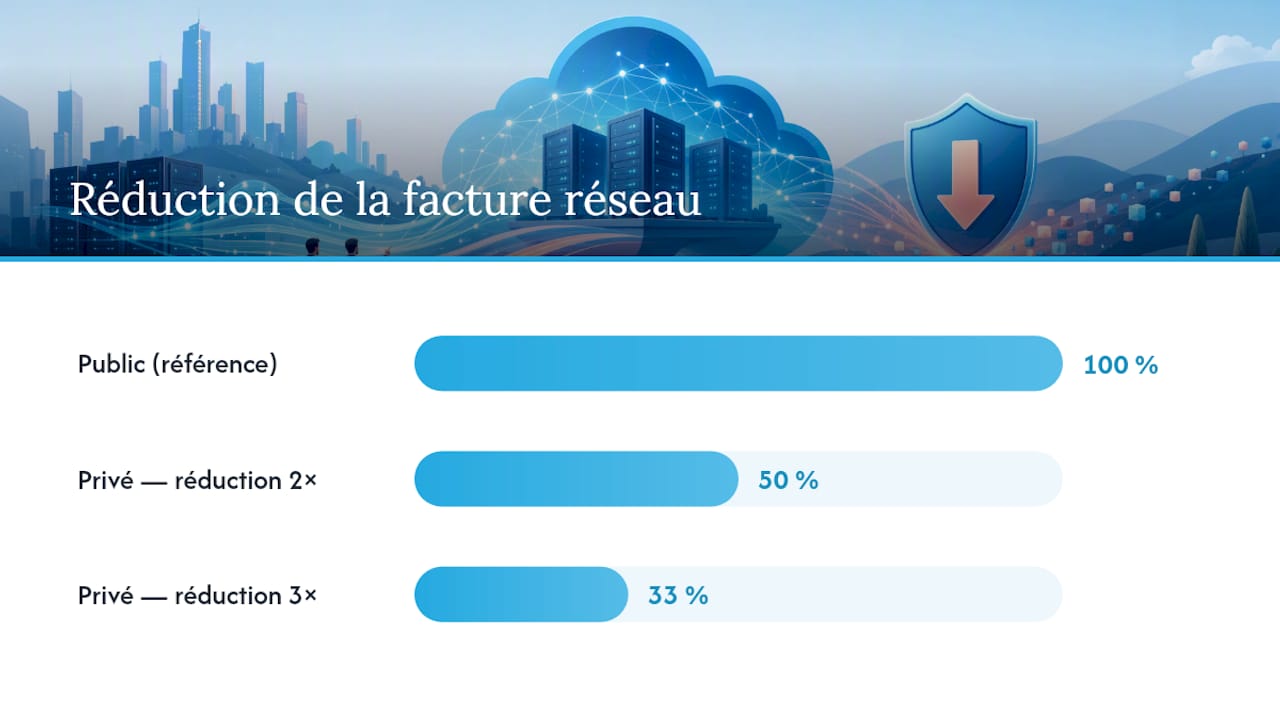
Pro tip: Keep components that exchange a lot of data, like a database and its cache, together in the same private environment. According to industry migration guides, this can cut your network bill by a factor of two to three.
Market analysts agree. Instead of an all-public or all-private choice, they recommend a hybrid strategy that places each workload based on how critical it is and what it costs to run.
How should you audit your infrastructure before migrating?
A thorough audit prevents unpleasant surprises partway through the project. Here is the process we recommend before you decide to switch:
- Map your services and their dependencies: list every application along with its database, message queues, and the APIs it calls or that call it.
- Build a criticality matrix: rate each service on business impact and tolerance for downtime. This shows you what can wait and what can't.
- Collect real usage data: look at the CPU, memory, storage and network latency you actually used over at least 30 days, not just the provisioned figures.
- Check your software licenses: some vendors have different rules for public, private and hybrid hosting.
- Pick your first candidates: start with workloads that carry little business risk but show clear cost savings. This gives you a credible pilot without putting your operations at risk.
This step usually takes longer than expected. It's better to give it plenty of time than to rush it to meet an arbitrary deadline.
Rehost, replatform or refactor: which migration strategy should you choose?
Your choice of method should depend on how much risk your organization can handle, not on technical dogma. Most projects use some mix of five approaches:
- Rehost: move the application as it is, with no changes. This is fast and limits short-term risk.
- Replatform: make small changes to the architecture, such as moving a database to a managed engine, without rewriting the business logic.
- Refactor: redesign the application to take advantage of automation and containers. This is worth it when the return on investment justifies the effort.
- Retire: shut down services you no longer need instead of migrating them. This leaves less to manage.
- Retain: leave some workloads where they are when migrating them would cost more than staying put.
Today's private clouds borrow heavily from public cloud practices such as infrastructure as code and container orchestration. As a result, you can run critical workloads almost as flexibly as you could with the major public cloud providers.
The most reliable plans mix these methods instead of forcing a single one. For example, start with a rehost pilot on a first batch. Then migrate step by step, replatforming the services that call for it, and run load tests before each final cutover.
Replication, snapshots or sync: how do you migrate data without losing any?
Moving the data is the most delicate step of any migration, because mistakes here hit production directly. Three techniques are common in real projects, and each carries a different level of risk.
- Continuous replication: data streams constantly from the old environment to the new one. This keeps downtime to a minimum during the final cutover.
- Snapshot migration: you capture a full image of the system at a given moment and transfer it. This works well for data that doesn't change much, but it requires a longer freeze window.
- Offline transfer: for very large volumes, shipping the data on dedicated physical media keeps you from tying up your network bandwidth for weeks.
While the transition is under way, two-way sync keeps both environments consistent. This helps when several teams keep writing to the old system while the new one settles in. Technical migration guides recommend logical or binary log replication for databases, because it puts less load on the source system.
Pro tip: A successful transfer alone doesn't prove a data migration worked. Run checksums on representative samples and do a full restore test in the target environment. Only switch DNS after you've watched the new system handle real traffic for at least 48 hours.
Restore tests should mimic realistic scenarios that reflect real operating constraints, especially to confirm your recovery time and recovery point objectives (RTO/RPO).
How do you stay secure and compliant during the migration?
Organizations are most exposed during the migration itself. For a while, two environments run side by side, and their security rules may not match. A few principles help reduce this risk:
- Encrypt data at rest and in transit, and manage keys centrally with a key management service (KMS) kept separate from the application servers.
- Segment the network between the source and target environments so a breach in one can't spread to the other.
- Adopt zero trust, where every access request is verified, even inside the network.
- Require clear contract terms on where data is physically stored and on your right to audit.
- Keep access and change logs for the entire project so you have evidence if you're audited.
These requirements match those of GDPR and the NIS2 directive, which demand stronger traceability from organizations classed as critical. For health data, the French HDS framework also requires the hosting provider to hold a specific certification.
How should you run a private cloud after the migration?
Once the cutover is done, you still need to stay alert, but the focus shifts. In a private cloud, most of the operational responsibility falls on your organization. There is no longer a hidden managed layer handling incidents on your behalf.
- Set up a monitoring stack: Prometheus to collect metrics, Grafana to visualize them and Loki to centralize logs.
- Write runbooks that spell out who does what during an incident, including backup procedures and a schedule for security patches.
- Schedule recovery tests every quarter, not just once during the initial project.
- Set up FinOps metrics that track the actual cost of each service, so TCO doesn't quietly creep up after a few months.
Without this discipline, a private cloud quickly loses its cost advantage over the public cloud.
How a managed offering like Yundera helps your migration succeed
Many organizations find themselves in the same position: they want the sovereignty of a private cloud without hiring a dedicated operations team. Yundera meets this need with fully managed private servers hosted in France. Businesses keep full ownership of their data and can export it at any time.
In practice, this kind of offering covers what SMBs and freelancers use most often:
- secure file sharing and website hosting, with no technical background needed;
- photo and content storage with secure access from anywhere;
- a catalog of more than 100 ready-to-use open source applications.
A realistic getting-started checklist always looks the same. Start with an inventory audit and a pilot on a limited scope. Then migrate in supported batches, and check each stage before moving on to the next.
Outlook: what rules of thumb should guide your decision today?
The public vs. private debate is often framed the wrong way. What really matters are three signals: the actual cost over 3 to 5 years, how sensitive your data is, and your growing need to run AI locally instead of through third-party APIs.
Our advice is practical. Go hybrid, and migrate step by step instead of all at once. Also accept that internal governance (runbooks, skills, FinOps) is a core skill in its own right, not a side task.
— Yundera
Getting started with a managed private cloud migration
Companies without a dedicated infrastructure team don't have to choose between sovereignty and simplicity. Custom private servers are available fully managed and hosted in France. You can export your data at any time, and your data is never collected or sold.
This approach is a particularly good fit for SMBs, startups and freelancers who want to take back control of their data without building an in-house cloud operations team. The page for SMBs and startups explains how this model lightens the operational load while keeping the benefits of a private cloud: predictable costs, secure access from anywhere, and more than 100 open source applications already installed.
The best way to begin is an inventory audit of how you currently use your tools. Follow it with a supported pilot on a limited scope before migrating anything on a larger scale.
Sources
- Digital sovereignty: a collective effort
- Gartner research on hybrid cloud strategies
- Public vs private cloud — Fortinet
Frequently Asked Questions
What is a private cloud migration?
It means moving applications and data from a public or on-premises environment to infrastructure used by a single organization. It usually starts with an audit and a pilot, followed by a step-by-step migration in batches.
How do you set up a private cloud?
First, map your existing workloads. Next, choose between on-premises hosting, colocation or a managed offering. Then migrate in stages, using restore tests and a recovery plan to check each batch before the final cutover.
What exactly is a private cloud?
A private cloud is IT infrastructure used by a single company and never shared with other customers. In the public cloud, by contrast, resources are shared among many users.
Which cloud solution works best for individuals and small businesses?
Individuals, families and freelancers may want to keep ownership of their data without running a server themselves. For them, a managed offering strikes a balance between ease of use and real sovereignty.
Private Cloud Migration: A Guide for CIOs and Decision-Makers