Open Source Site-to-Site VPN: Which Protocol to Choose in 2026

For a reliable, high-performance open source site-to-site VPN, go with WireGuard for simple links between two or a handful of sites, and strongSwan (IPsec) when you need to guarantee compatibility with existing network equipment. SoftEther remains the best card to play against a restrictive firewall or when you need multi-protocol support.
What follows explains how to configure each one, which pitfalls to avoid, and how to test the result before pushing it to production.
In short:
- Setting up a site-to-site VPN starts with gathering precise public IPs and subnets, and checking the NTP clock to avoid failed negotiations.
- WireGuard is the recommended choice for simple, fast links, while IPsec with strongSwan guarantees maximum compatibility with existing hardware.
- The NAT rule must always come before the masquerade rule for the tunnel to come up correctly, and a bidirectional test is mandatory before going live.
- The architecture choice — VPS hub, local appliance, or managed cloud gateway — mostly comes down to in-house skills and sovereignty constraints.
- When something breaks, most failures trace back to a misplaced NAT rule or a mismatch in
AllowedIPsor IKE negotiation.
Table of contents
- What is a site-to-site VPN, and when should you use one?
- How to configure a site-to-site VPN: the complete checklist
- WireGuard, strongSwan, SoftEther, OpenVPN: which one to pick?
- VPS hub, local appliance, or cloud gateway: which architecture?
- Why your tunnel isn't working (and how to fix it)
- Securing a site-to-site VPN over the long run
- Should you hand your VPN over to a managed service?
- A managed option for those who want control without running the infrastructure
- Official documentation to go further
- Sources
- Frequently asked questions
What is a site-to-site VPN, and when should you use one?
A site-to-site VPN links two remote local networks through a permanent encrypted tunnel, as if the machines on both sides shared the same physical segment. It's a permanent, secure connection between two local networks, unlike a remote-access VPN that connects a single workstation to the company network.
The distinction matters for your architecture. A salesperson on the road needs classic remote access. A company with a head office and three branches needs a network-to-network tunnel, where every workstation on one side can see the servers and printers on the other with no per-device configuration.
The most common use cases for this kind of tunnel:
- Linking a head office to one or more branches to share internal resources (files, ERP, network printing).
- Connecting a local datacenter to cloud infrastructure, for example to replicate backups without exposing servers on the Internet.
- Interconnecting several sites in a mesh topology for geographically distributed organizations.
- Securing traffic between two production environments belonging to the same legal entity.
A site-to-site VPN isn't the only possible answer. Organizations that want to restrict application access device by device, rather than opening up an entire subnet, are increasingly turning to ZTNA, an approach that verifies each connection individually. But for linking whole networks in mutual trust, such as two offices of the same company, the site-to-site tunnel keeps the edge: it's simpler to administer and doesn't require reconfiguring every application.
How to configure a site-to-site VPN: the complete checklist
Before you open a single configuration file, gather the information that saves you from starting over three times. It's the tedious part, but everything else depends on it.
1. Gather the network prerequisites. Note the public IPs (or dynamic DNS names) of each site, the LAN subnet ranges to interconnect, the MTU value of your Internet links, and check that NTP is running on both gateways. A clock drift of a few minutes is enough to make IKE negotiations fail in IPsec.
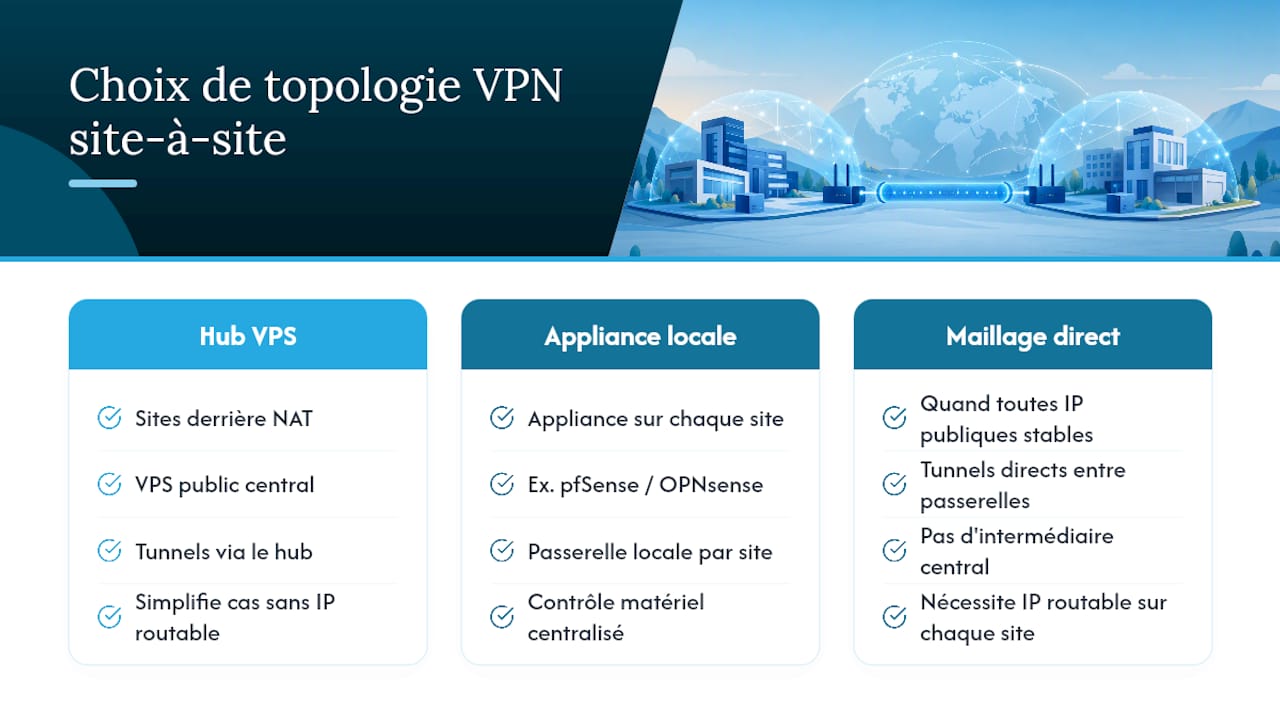
2. Choose the topology. Three options compete: a public VPS hub (handy when one or more sites sit behind a NAT router with no static IP), a hardware appliance such as pfSense or OPNsense at each site, or a direct mesh between gateways when they all have stable public IPs. The VPS hub greatly simplifies cases where at least one site has no routable address.
3. Configure the peers and policies. On WireGuard, that means generating a key pair per site, declaring each peer with the AllowedIPs matching its LAN subnet, and enabling PersistentKeepalive on the side behind NAT to keep the tunnel open. On IPsec with strongSwan, you define conn entries with the local and remote subnets, a proposal that matches on both ends, and an identical IKEv2 policy on each side.
4. Add the routes and fix the NAT. Each gateway needs a static route pointing the remote subnets at the tunnel interface. This is also the moment to add a NAT bypass rule placed before any masquerade rule — otherwise the firewall rewrites the source addresses and breaks the tunnel before it even forms.
5. Test and validate. Run a ping from one LAN to the other, check the path with traceroute, read the service logs (journalctl -u wg-quick@wg0 or the strongSwan logs), and confirm the tunnel stays up after several minutes of inactivity, not just at the moment of the initial test.
Here's a sample WireGuard configuration fragment on the hub side, for a remote site behind NAT:
[Peer]
PublicKey = <clé_publique_du_site_distant>
AllowedIPs = 192.168.20.0/24
PersistentKeepalive = 25
Pro tip: Always test the tunnel in both directions before calling it operational. Traffic that flows from site A to B but not the other way almost always points to a missing route or a badly ordered NAT rule on the return site.
WireGuard, strongSwan, SoftEther, OpenVPN: which one to pick?
The protocol choice depends less on raw performance numbers than on your hardware estate and your network constraints.
- WireGuard offers the best performance-to-simplicity ratio: built into the Linux kernel, it uses little CPU and its configuration comes down to a few lines per peer. It's the default choice for simple links between Linux servers or recent routers. Our WireGuard deployment guide covers the full server-side setup.
- strongSwan (IPsec) remains the enterprise benchmark for interoperability: many professional environments still favor IPsec because virtually every router, firewall, and appliance on the market supports it natively, including older hardware that will never get a WireGuard update.
- SoftEther stands out at traversing strict firewalls: this open source multi-protocol server can carry VPN traffic over port 443, which makes it valuable behind corporate proxies or aggressive network restrictions.
- OpenVPN has a similar advantage on port 443 and a very large user base, but it demands more CPU than WireGuard for equivalent throughput, which hurts on high-volume links.
For day-to-day maintenance, WireGuard wins on troubleshooting simplicity: few parameters, few layers to inspect. IPsec, by contrast, requires synchronizing identical proposals on both ends — the single biggest source of support tickets in heterogeneous environments.
VPS hub, local appliance, or cloud gateway: which architecture?
The public VPS hub solves a very concrete problem: linking sites that have no static IP address. An entry-level VPS is more than enough to carry WireGuard traffic between several sites, at a monthly cost close to a phone plan.
- VPS hub: ideal when one or more sites sit behind NAT with no fixed public IP; infrastructure cost is minimal, but you become responsible for the availability of the VPS itself.
- Local appliance (pfSense, OPNsense): solid open source options for dedicated hardware, with an upfront hardware investment and maintenance time to plan for, but no dependency on a third-party host.
- Managed cloud gateway: worth it if you're adding sites quickly and want to delegate availability, at the cost of less control over fine-grained tunnel configuration.
The right choice mostly comes down to your in-house skills. A team that already knows Linux will naturally lean toward a VPS hub with WireGuard. An organization with data sovereignty constraints on where the hub is hosted will need to check where that VPS physically sits, not just what it costs.
Why your tunnel isn't working (and how to fix it)
Most tunnels that fail share the same causes, almost always in this order of frequency.
- Misplaced NAT rule: the NAT bypass rule must always come before the masquerade rule. Without it, your router rewrites the source addresses of tunnel-bound traffic before it leaves, which breaks the policy match on the remote end.
- Badly defined AllowedIPs or policies: an
AllowedIPsthat's too broad or too narrow on WireGuard, or subnets that overlap between two sites, prevents correct routing and creates addressing conflicts that are hard to diagnose. - Proposal or IKE mismatch: different algorithms or IKE versions between the two IPsec endpoints make negotiation fail silently, with no explicit error message on the user side.
- Clock out of sync: without NTP running on both gateways, certificates and security associations (SAs) expire inconsistently.
Pro tip: When a tunnel comes "up" but passes no traffic, run tcpdump on the physical interface (not the tunnel interface) on both sides at the same time. If packets leave one site but never arrive at the other, the problem is almost always a NAT rule or an intermediate firewall, not the VPN itself.
Securing a site-to-site VPN over the long run
A tunnel's security isn't decided at initial configuration alone, but in the operational routine that follows.
- Favor modern algorithms (ChaCha20-Poly1305 for WireGuard, AES-GCM for IPsec) and schedule regular key and certificate rotation, not just after an incident.
- Apply ACL rules between the interconnected subnets: an open tunnel shouldn't grant full access to the entire remote LAN if only certain servers need it.
- Set up active monitoring (alert when the tunnel drops, periodic connectivity checks) rather than the occasional manual check.
- Back up the configuration files somewhere other than the server itself, and document the procedure for revoking a compromised key before you need it in a hurry.
Should you hand your VPN over to a managed service?
Building and maintaining an open source site-to-site tunnel takes real operational discipline: key rotation, monitoring, security updates on every gateway. For a team with the time and in-house network skills, WireGuard or strongSwan remain excellent choices — free, and entirely under your control.
For an organization without a dedicated network administrator, the recurring workload weighs more than the software cost itself: it's human time, not licensing. A managed private cloud server can then cover secure connectivity without pushing that load onto a team that's already busy elsewhere. The trade-off is real: you accept a recurring subscription in exchange for someone else handling patches and availability.

A managed option for those who want control without running the infrastructure
Some alternative solutions let you get the security of a site-to-site VPN without taking on the operational load that manual VPN tunnel maintenance implies.

A fully managed private server hosted in France can give you access to many preinstalled open source applications, with no technical skills required for day-to-day administration. The data stays the user's property, with no collection or resale, and can be exported at any time. It's a sensible option when your team has no time to spend on key rotation or monitoring an IPsec tunnel, but data sovereignty remains a non-negotiable requirement.
If your organization is looking to secure traffic between sites without hiring another network administrator, the Yundera private server page lays out the available features and how to get started. Smaller organizations looking to cut IT infrastructure costs will also find concrete guidance on the page dedicated to startups and SMBs.
Official documentation to go further
To dig deeper into configuration, the strongSwan documentation covers enterprise IPsec scenarios in detail, while the SoftEther project site documents its multi-protocol operation. The site-to-site IPsec VPN guide for MikroTik remains a practical reference for step-by-step router configurations.
Sources
- VPN site-to-site : connexion entre deux réseaux | Yolah
- VPN site à site WireGuard : relier deux réseaux (guide 2026) - VPNSmith
- SoftEther VPN Project - SoftEther
- strongSwan - IPsec VPN for Linux, Android, FreeBSD, macOS, Windows
Frequently asked questions
What is a site-to-site VPN?
It's a permanent encrypted tunnel that links two remote local networks over the Internet, letting machines on each side communicate as if they were on the same physical network.
How do you configure an open source site-to-site VPN?
Gather the public IPs and subnets for each site, choose WireGuard or strongSwan depending on your hardware, configure the peers with their routes and AllowedIPs, add a NAT bypass rule before the masquerade, then validate with ping and traceroute tests in both directions.
Which open source protocol should you choose for a simple site-to-site VPN?
WireGuard fits most cases thanks to its simple configuration and low CPU usage; strongSwan is preferable if you need to interconnect older or heterogeneous network equipment.
Is it legal to have a VPN?
Yes — using a VPN, site-to-site included, is perfectly legal in France for professional or personal use; only what you do with it can be a problem, if it's used to commit an offense.
What should you do if the site-to-site VPN tunnel passes no traffic?
Check the order of the NAT rules on each gateway first, along with the consistency of the AllowedIPs or IPsec policies between the two ends, then inspect the logs and run a tcpdump on the physical interface to pinpoint where the packets are being lost.
Open Source Site-to-Site VPN: Which Protocol to Choose in 2026