Self-Hosted Private DNS: A Managed Resolver, Ready to Go

A managed private DNS server running on a private cloud, hosted in France, encrypting every one of your lookups and leaving you the owner of your data: that's the clear recommendation for anyone looking for a self-hosted private DNS without installing or maintaining any infrastructure. Yundera offers exactly that service — fully managed, no technical skills required.
In three steps:
- Subscribe to a Yundera private cloud server
- Receive your personalised DoH/DoT hostname
- Set up your devices in under 10 minutes
Key Takeaways
A managed private DNS hosted in France encrypts your lookups, keeps you the owner of your data and goes live in under 30 minutes with no technical skills.
| Point | Details |
|---|---|
| Working definition | A managed private DNS is a resolver hosted on a private cloud server and administered by a provider — not a DIY local install. |
| Protocols to insist on | DoH (port 443), DoT (port 853) and DNSSEC are the three minimum requirements for any serious managed service. |
| Limits of encrypted DNS | DNS protects your name lookups — not your IP address or the content of your traffic; pair it with a VPN if you need that. |
| Contract questions | Check the logging policy, whether servers sit in France or the EU, and whether you can export your data. |
| Yundera | Private cloud server hosted in France, DoH/DoT/DNSSEC included, guaranteed data export, up and running in under 30 minutes. |
Table of Contents
- What does "self-hosted private DNS" actually mean in this guide?
- What are the real benefits for individuals and small organisations?
- Which protocols should you require from your provider?
- What a managed private DNS protects — and what it doesn't
- Logs, export, SLA: what to clarify before you sign up
- How do you set up your private DNS resolver on your devices?
- What to expect on pricing and extra costs
- How do you assess a provider before committing?
- Getting started with Yundera: the practical steps
- Why we recommend the managed model
- Your managed private DNS, live in under 30 minutes
- Sources
What does "self-hosted private DNS" actually mean in this guide?
According to IBM, the term "private DNS" covers several different things: private cloud zones on one hand, a private resolver on the other. In this guide it refers exclusively to a DNS resolver hosted on a private cloud server and administered by Yundera, which encrypts your queries, keeps your logs under your ownership and guarantees operational availability.
This guide does not cover:
- Installing Pi-hole, Bind or Unbound locally on your own hardware
- Running physical servers at home
- Free public resolvers (Cloudflare, Google DNS)
The managed service promise rests on three pillars: encrypted lookups (DoH/DoT/DNSSEC), full ownership of your logs, and operational support included.
What are the real benefits for individuals and small organisations?
A properly configured, encrypted private DNS reduces your exposure to interception, address hijacking and targeted advertising. Here's what you actually gain with a managed service:
- Privacy: your DNS queries no longer travel in the clear through your ISP
- Data sovereignty: you keep ownership of the logs while the provider handles the technical side
- Parental and anti-malware filters: enabled and updated automatically, with nothing for you to do
- Zero maintenance: updates, redundancy and backups are all handled by the provider
- High availability: redundant infrastructure with no single point of failure
The fundamental difference from a public resolver comes down to the trust model. With a public resolver, you hand your logs to a third party whose commercial interests may not align with yours. With a managed private DNS, you delegate the technical management while remaining the owner of the data.
Pro tip: Combine your managed private DNS with a VPN for complete protection: DNS encrypts your name lookups, while the VPN encrypts all of your traffic and hides your destination IP address. The two tools complement each other — one is not a substitute for the other.
Which protocols should you require from your provider?
DoT uses port 853 and can be spotted or blocked by a network administrator. DoH travels over port 443 — the same port as ordinary HTTPS traffic — which makes it far harder to filter. DNSCrypt adds an extra authentication layer. DNSSEC, finally, validates the authenticity of DNS responses to prevent record spoofing.
At a minimum, require the following from your managed provider:
- Simultaneous support for DoH and DoT (both, not one or the other)
- Valid TLS certificates, renewed automatically
- DNSSEC validation enabled by default
- Documented anti-spoofing mechanisms
Worth remembering: picking a provider that offers DoH and DoT maximises compatibility across all your devices and your resilience against network blocking.
What a managed private DNS protects — and what it doesn't
A managed private DNS reduces your attack surface by obscuring your infrastructure: unlike public resolvers, your records aren't publicly viewable.
What it protects:
- The content of your DNS queries (the domain names you resolve)
- Exposure to DNS-based targeted advertising
- Hijacking and cache poisoning attempts
What it doesn't protect:
- Your destination IP address (visible to the sites you visit)
- The content of the pages you browse
- Your online identity in general
Encrypted DNS is not a VPN. It only encrypts name resolution. To hide your traffic in full, pair private DNS with a VPN. HTTPS also remains essential for encrypting the content of your exchanges, and keeping your devices updated limits the attack vectors that DNS alone cannot cover.
Logs, export, SLA: what to clarify before you sign up
Choosing a resolver hosted in Europe makes GDPR compliance, data minimisation and transparency about where operations take place much easier. Initiatives such as DNS4EU confirm that an EU-based resolver can limit the collection of personal data and strengthen digital sovereignty.
Before signing, ask your provider these questions:
- How long are logs retained, and are they anonymised?
- Can I export my data at any time, and in what format?
- Where are the servers physically hosted (country, certified data centre)?
- What availability SLA is guaranteed (RPO/RTO)?
- Are the anti-malware filters updated automatically?
Provider verification checklist:
- Hosting in France or the EU, with proof
- A written, enforceable policy of never reselling data
- Data export available at any time
- Support included in the subscription, with a guaranteed response time
- Automatic updates to filtering signatures
How do you set up your private DNS resolver on your devices?
Setup takes under 10 minutes on most platforms. Your managed provider gives you a DoH/DoT hostname once you subscribe.
- Subscribe to your managed private DNS server plan
- Get the DoH/DoT hostname you're given (for example:
votreserveur.yundera.com) - Android: Settings → Network → Private DNS → enter the DoT hostname (Android doesn't accept raw IP addresses, only a hostname)
- iOS: install a DoH configuration profile via your provider's app or a
.mobileconfigfile - Windows 11: Settings → Network → Adapter properties → DNS → turn on "DNS over HTTPS" and enter the DoH URL
- macOS: System Preferences → Network → Advanced → DNS → add the DoH URL
- Firefox: Settings → Privacy → DNS over HTTPS → max protection → custom URL
- Chrome / Edge:
chrome://settings/security→ "Use secure DNS" → custom provider → paste the DoH URL - Compatible router: open the admin interface → DNS → replace the ISP servers with the DoT hostname or DoH URL (this covers every device on the network in one go.
Pro tip: Once configured, test for DNS leaks with a tool like dnsleaktest.com: if only your private server shows up in the results, your setup is correct. To roll back, simply set the DNS settings on each device back to "Automatic".
What to expect on pricing and extra costs
Yundera publishes its pricing plans online, with no hidden setup fees.
Things to plan for:
- Base plan: access to the private DNS resolver, DoH/DoT, DNSSEC, support included
- Advanced options: enhanced parental filtering, detailed log export, premium SLA
- Possible additional costs: dedicated IP, specific integrations, priority assistance
When comparing offers, look at the cost-to-SLA ratio rather than the headline price. A €5-a-month service with no availability guarantee and no documented support costs you more in lost time than a slightly pricier subscription with a clear SLA.
How do you assess a provider before committing?
- Server location: France or the EU, with proof
- Logging policy: retention, anonymisation, third-party access
- Supported protocols: DoH, DoT, DNSSEC (all three)
- Documented SLA: guaranteed availability, support response time
- Data export: format, frequency, procedure
- Price and commitment term: monthly with no commitment, or annual with a discount
Evidence to ask for:
- TLS certificates and proof of hosting in France
- Screenshots of the management interface
- Documentation of the data export procedure
- Terms and conditions stating that data is never resold
For families and small organisations, the priority criteria are: hosting in France, a clear logging policy and responsive support. Desirable but secondary: dedicated IP, advanced integrations, a formal contractual SLA.
Getting started with Yundera: the practical steps
Yundera offers a fully managed private cloud server hosted in France, with more than 100 open source applications available — private DNS among them.
- Choose your plan on yundera.com based on how you'll use it (individual, family, small business)
- Create your server: automatic provisioning, no technical skills required
- Receive your personalised DoH/DoT hostname by email
- Configure your devices using the guide above (under 10 minutes)
- Verify with a DNS leak test, then contact support if needed
Data sovereignty is a contractual commitment, not a marketing line.
Pro tip: For families, turn on the parental filtering profile during initial setup: it blocks malicious domains and inappropriate content with no day-to-day intervention. For small businesses, request a weekly log export to keep an audit trail.
Why we recommend the managed model
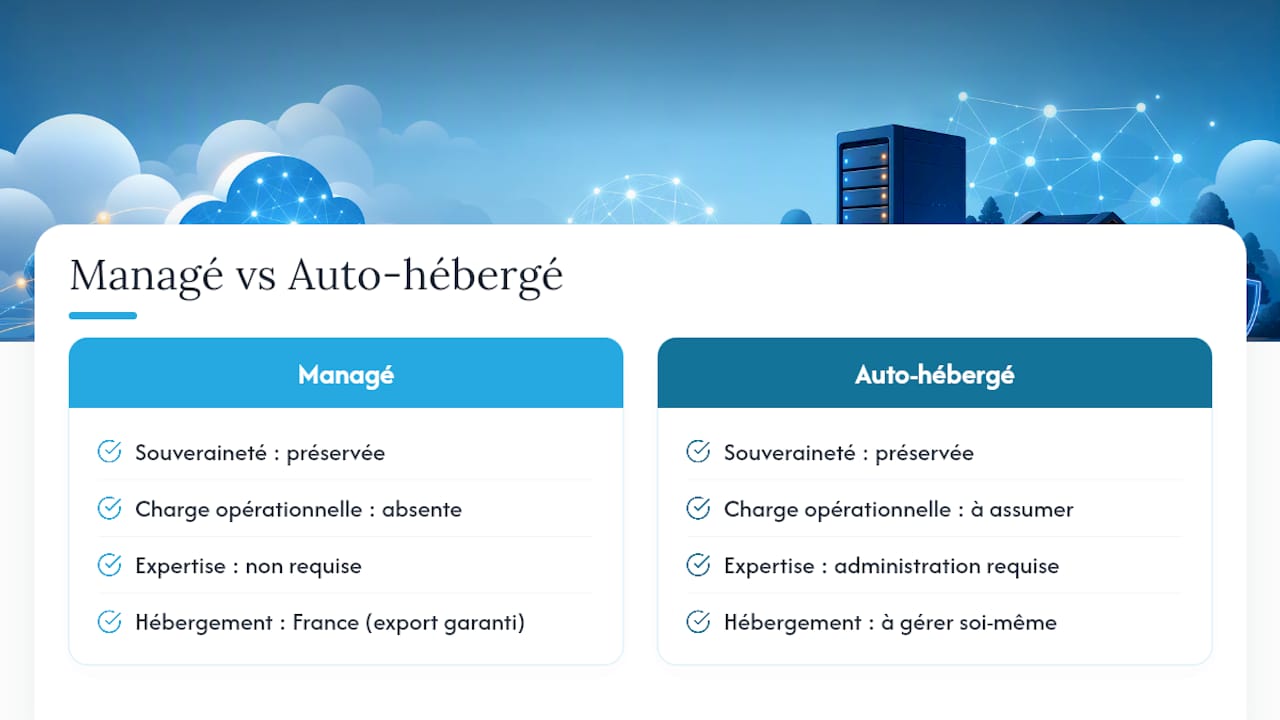
Most guides to private DNS assume you're willing to administer a server. That's not our assumption. We believe digital sovereignty shouldn't require systems administration expertise. A managed service hosted in France, with guaranteed data export and support included, gives you the same level of control as a DIY install without the operational burden. The real question isn't "can I install it myself?" but "do I want to maintain it indefinitely?" For the vast majority of individuals, families and small organisations, the answer is no.
Your managed private DNS, live in under 30 minutes
Yundera gives you access to a private cloud server hosted in France, with encrypted private DNS (DoH/DoT/DNSSEC), anti-malware filtering, guaranteed data export and support included — with no installation for you to manage. Unlike a DIY solution, you're up and running 10 to 30 minutes after subscribing, with a DoH/DoT hostname ready to configure on all your devices. For families, parental filtering can be switched on with a single click. For small businesses, SLA and professional support options are available from the moment you subscribe. Browse the plans on Yundera and set up your first device today.
Sources
- DNS sécurisé — Secure‑OS
- DNS privé vs public : quel choix pour votre business - Entreprise Evolution
- Dns4eu : mon analyse du résolveur DNS européen — David Informaticien
- Resolveurs DNS publics européens — DevProblems
Self-Hosted Private DNS: A Managed Resolver, Ready to Go