Open Source DMS: Digitize and Archive Your Documents in 2026
An open source DMS (document management system) lets you digitize your invoices, contracts and letters, make them searchable and keep them organized, all without handing your archives over to a SaaS vendor. Free software such as Paperless-ngx runs OCR, applies tags automatically and produces PDF/A files built for long-term archiving. The tool alone won't make you compliant, though. You also have to follow legal retention periods and GDPR rules.
Key takeaways:
- Under the French Commercial Code, accounting records, including customer and supplier invoices, must be kept for 10 years from the end of the financial year.
- Article L102 B of the French Tax Procedures Code (Livre des procédures fiscales) allows paper invoices to be stored electronically, as long as they are scanned according to rules set by ministerial order.
- Since September 1, 2026, all businesses must be able to receive electronic invoices through a certified platform. SMEs will also have to issue them from September 1, 2027.
- Paperless-ngx is licensed under GPL-3.0. It uses Tesseract to recognize more than 100 languages and archives documents as PDF/A while keeping the originals.
- Paperless-ngx stores documents unencrypted, so a self-hosted DMS must run on a trusted host and be backed up following the 3-2-1 rule.
Table of Contents
- What is a DMS and why self-host it?
- How long must a business keep its documents?
- Can you destroy paper originals after scanning?
- E-invoicing in 2026: what changes for archiving?
- Which open source DMS should you choose?
- How do you set up a DMS in 4 steps?
- Which GDPR rules apply to document archiving?
- How do you secure and back up a self-hosted DMS?
- Yundera: an open source DMS on your own server in France
- The most common mistakes when going paperless
- Sources
- Frequently Asked Questions
What is a DMS and why self-host it?
A DMS (document management system) is software that manages a document from start to finish. It takes the document in, files it, makes it searchable, and deletes it once there is no longer any reason to keep it. It does this through six functions:
- Capture: importing scans, PDFs and email attachments.
- OCR: reading the text in images so that a scan becomes searchable.
- Indexing: adding metadata such as the date, sender, amount or document type.
- Filing: organizing documents with tags, correspondents and categories instead of a folder tree.
- Search: querying the full text and metadata in seconds.
- Retention and deletion: setting a retention period for each document and purging it when that period ends.
A plain file share just stores documents. A DMS also knows what they contain and how long to keep them. That metadata and lifecycle are what let you find a supplier invoice from 2019, or prove that a file was deleted on time.
Archives are a good reason to self-host. Contracts, payslips and invoices are some of the most sensitive documents an organization has. They also need to stay accessible for a long time, often ten years, which is longer than many SaaS products survive. An open source DMS that exports to open formats keeps you from being locked in. Paperless-ngx, for example, states that your data is stored locally on your server and is never transmitted or shared unless you explicitly choose to do so.
How long must a business keep its documents?
A business must keep its documents for 5 to 10 years, depending on the type. Accounting records, including invoices, have the longest period: 10 years. The Service-Public page on retention periods gives these periods:
- Accounting records and invoices: 10 years from the end of the financial year, for both customer and supplier invoices.
- Tax documents: 6 years.
- Contracts and business correspondence: 5 years, whether on paper or electronic.
- Payslip copies: 5 years for the employer. They must also stay available in electronic form for 50 years or until the employee turns 75.
- Articles of association: 5 years from the date the company ceases to exist as a legal entity or is removed from the Trade and Companies Register (RCS).
If a document falls under more than one rule, the longest period applies. An invoice is both a tax document (6 years) and an accounting record under the Commercial Code (10 years), so you keep it for 10 years.
In a DMS, you can store each of these periods as data. Give each document type a standard retention period. Then add a retention_end_date field to each record, calculated from the end of the financial year or from whatever event starts the clock. A saved search on that field will then list, every year, the documents whose retention period has ended.
Pro tip: for invoices, count from the end of the financial year, not from the issue date. Getting this wrong is the most common mistake, and it causes records to be deleted too early.
Can you destroy paper originals after scanning?
For invoices, yes, as long as you follow the scanning rules set by the authorities. For other documents, don't destroy anything unless a legal text says you can. Article L102 B of the French Tax Procedures Code sets out three rules:
- Duration: documents the tax authorities can audit must be kept for six years.
- Format: a document created or received on paper can be kept either electronically or on paper for that same period.
- Scanning: the rules for scanning paper invoices are set by order of the minister responsible for the budget.
So before you destroy anything, look up the order currently in force and make sure your scanning process meets it. Also keep the paper originals of any document that no law allows you to replace with a copy, such as notarial deeds or some hand-signed contracts. The ten-year retention period for accounting records, set out on the Service-Public page, applies to the scanned version as well.
In your DMS, always keep the raw scan file, unchanged, next to the OCR version. OCR and PDF/A conversion both change the file, and in an audit or a dispute the original file is the one that counts. Paperless-ngx already works this way: it saves the PDF/A while keeping the unmodified originals.
Pro tip: before you destroy a batch of paper documents, write down the date, the list of documents and the name of the person who checked the scans. That record shows the destruction followed a proper process.
E-invoicing in 2026: what changes for archiving?
Since September 1, 2026, more and more supplier invoices arrive electronically, and they must be archived electronically too. The official timeline published by Entreprendre.Service-Public sets these milestones:
- Receiving: mandatory for all businesses of every size since September 1, 2026.
- Issuing, for large and mid-sized companies: mandatory since September 1, 2026.
- Issuing, for SMEs and micro-businesses: mandatory from September 1, 2027.
- Channel: all invoices must be exchanged through a state-certified platform.
- Retention: a document created or received electronically must be kept in electronic form for 6 years from the invoice date (decree of May 16, 2023).
In practice, you should not print an electronic invoice and archive the paper copy, because the file is what counts. The 10-year period the Commercial Code sets for accounting records, noted on the Service-Public page, still applies.
A DMS does not replace the certified platform. It doesn't send invoices and has no part in exchanges with the tax authorities. It does a different job: it keeps a copy of every invoice with its metadata and lets you search all your archives at once, from electronic invoices and scanned paper invoices to contracts and letters.
Pro tip: if your certified platform forwards incoming invoices by email, point your DMS's automatic import at a dedicated mailbox. Paperless-ngx can import documents from multiple email accounts, with separate rules for each account.
Which open source DMS should you choose?
For a very small business, a freelancer or a small team, Paperless-ngx is often the best place to start. It's a free and very active project that covers the essentials without a lot of setup. According to the project's documentation on GitHub, its main features are:
- License: GPL-3.0. The code is open and you can use the tool without a subscription.
- OCR: the open source Tesseract engine recognizes more than 100 languages, including French.
- Archiving: documents are saved as PDF/A, a format designed for long-term preservation, next to the unmodified originals.
- Filing: tags, correspondents and document types.
- Automation: machine learning suggests tags, correspondents and document types based on how you filed documents before.
- Email import: it can check multiple accounts, each with its own rules.
- Generative AI: LLM features are optional and turned off by default.
Other tools are a better fit for some needs. Mayan EDMS is for organizations that need approval workflows and fine-grained access rights, though it takes longer to learn. A DMS built into a collaboration suite saves you adding another tool if your team already shares files there, but it usually has weaker OCR and automatic filing.
Four criteria help you decide:
- Team size: for one to ten users, simplicity matters most.
- Access control: HR or client files need separate, restricted access.
- Workflows: do you need an approval step before payment, or a signing process?
- Simplicity: a DMS that nobody bothers to feed is useless.
How do you set up a DMS in 4 steps?
Setting up a DMS takes four steps: scan, run OCR, file, then back up and purge. Each step relies on a few simple rules that you should decide at the start.
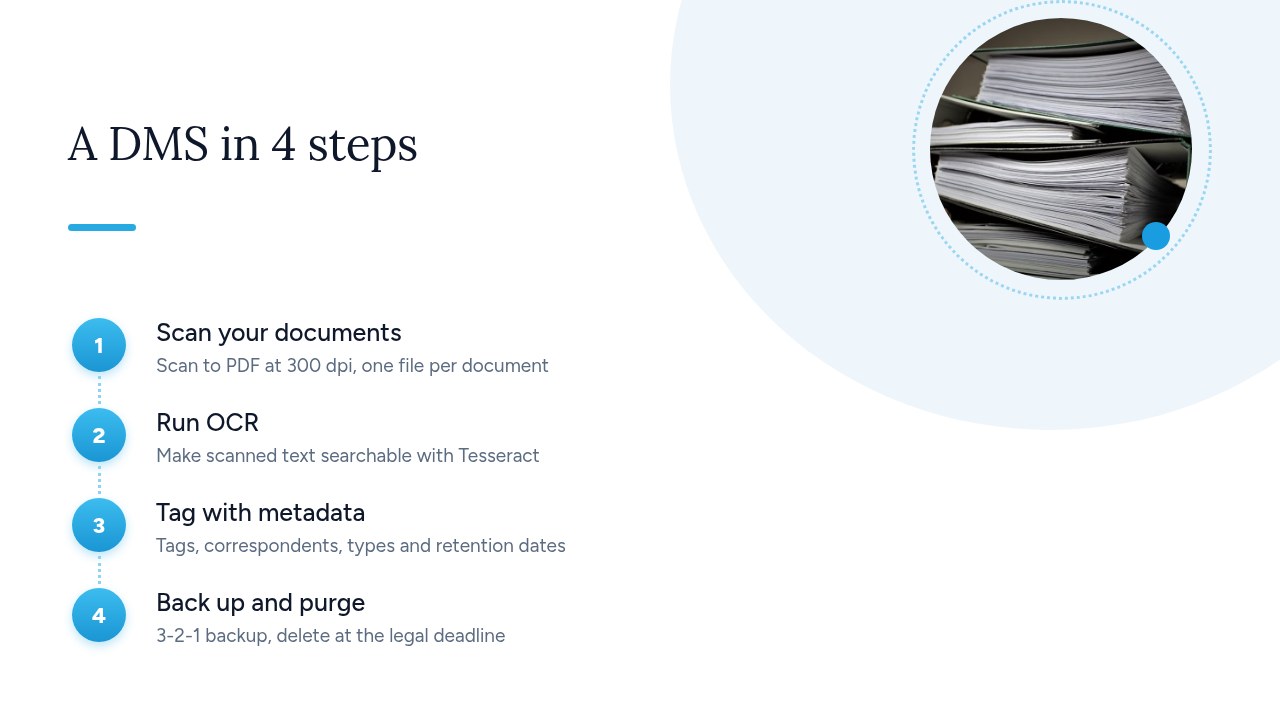
- Scan: scan to PDF at 300 dpi, one file per document. Never put a stapled batch of invoices into a single PDF. Drop the files into a folder the DMS watches (the consume folder in Paperless-ngx), or send them to a dedicated email address.
- Run OCR: set the recognition language to French, for example with
PAPERLESS_OCR_LANGUAGE=frain Paperless-ngx. The Tesseract engine recognizes more than 100 languages, but if the language is set wrong, full-text search gets much worse. - File: keep to a few tags (suppliers, customers, HR, tax), then add correspondents and document types. Give each type a retention end date based on the legal periods: 10 years for an invoice, 5 years for a commercial contract.
- Back up and purge: follow the 3-2-1 rule, meaning three copies on two different types of media, with one copy off-site. Once a year, go through the documents whose retention period has ended and delete those that contain personal data, as the CNIL requires.
Pro tip: don't start with ten years of boxes. Put the current year's documents into the DMS first and use your filing plan for a few weeks. Then work through the older documents in batches, one financial year at a time.
Which GDPR rules apply to document archiving?
Once an archive contains personal data, such as a payslip, a CV or a customer invoice, the GDPR requires three things: a limited retention period, restricted access, and deletion when the period ends. The CNIL is clear on this: “personal data cannot be kept indefinitely”. It describes three phases:
- Active database: the data is in everyday use, for example an open client file.
- Intermediate archiving: the file is closed but still needed, for example to meet a legal obligation or to deal with a dispute.
- Permanent archiving: an exceptional phase, only for data of historical interest.
For intermediate archiving, the CNIL requires a database separate from the active database, with restricted access. The separation can be physical or logical. The CNIL adds that “whatever the type of archive, all access to archived data must be logged.” It gives three examples of retention periods: 10 years for billing data, 5 years for payslips, and 2 years at most for a job applicant who wasn't hired.
Here is how these rules apply in a DMS:
- Group permissions: only HR can see HR files, and only accounting can see invoices.
- Access log: turn on logging in the application or on the server so you know who viewed what.
- Deletion when the period ends: the retention end date field described earlier also tells you what to purge.
Pro tip: create a separate document type for CVs with a 2-year retention period. CVs are the category people most often forget to purge.
How do you secure and back up a self-hosted DMS?
To secure a self-hosted DMS, assume the application does not protect the files on its own. The server, the network and the backups have to do that. The Paperless-ngx README says so plainly: the tool should never be run on an untrusted host, because information is stored in clear text without encryption. That leads to the following measures:
- A trusted, dedicated server: no machine shared with people you don't know, and no workstation left unlocked.
- Disk or volume encryption: this makes up for the lack of encryption in the application. See our guide to encryption at rest for SMEs.
- HTTPS everywhere: no document should cross the network in clear text, even on an internal network.
- One named account per person: use strong passwords and never share logins. This is also what makes it possible to trace who did what.
- 3-2-1 backups: three copies on two different types of media, with one copy off-site. Our article on the 3-2-1 rule explains the method in detail.
- Restore tests: at least once a quarter, restore a few documents to a test machine. You can't rely on a backup that has never been restored.
- Export to open formats: you must be able to get the PDF/A files, the originals and the metadata out of the tool. Paperless-ngx provides the
document_exportercommand for this.
Pro tip: back up the DMS database along with the files. Without it, you still have your PDFs, but you lose the tags, correspondents and retention end dates.
Yundera: an open source DMS on your own server in France
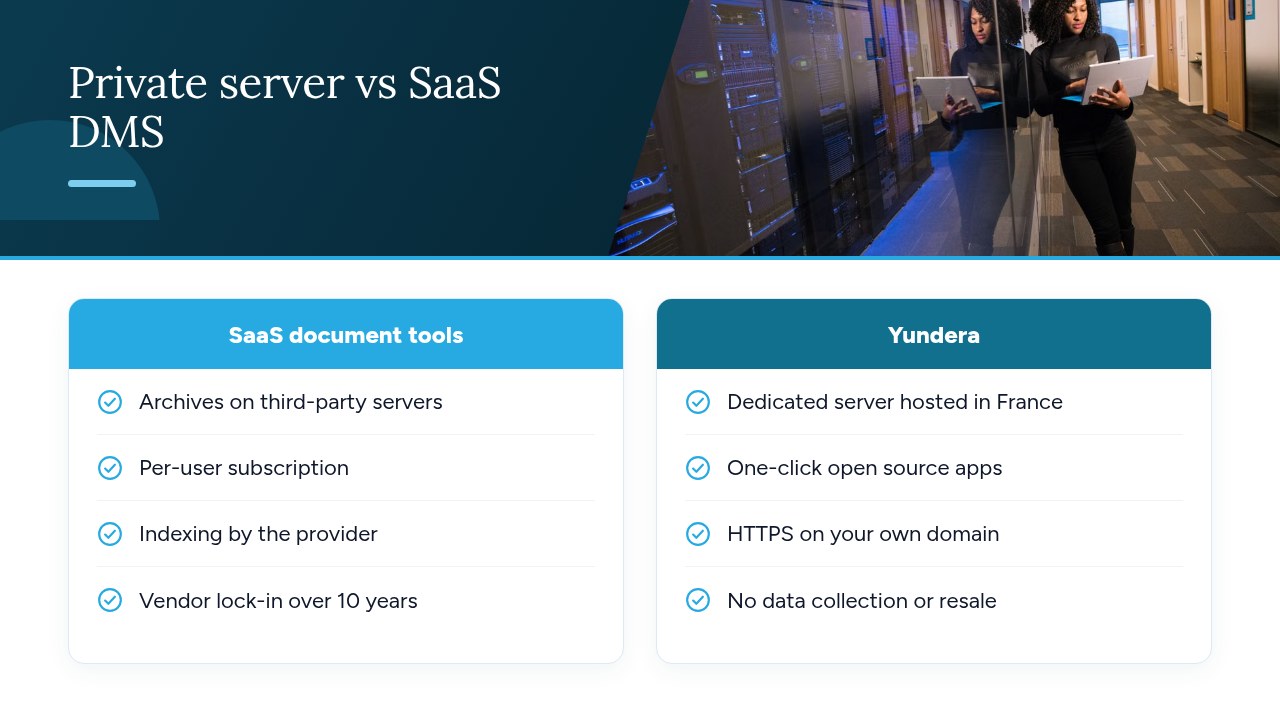
Yundera provides a managed private server, the Personal Cloud Server. It is hosted in France and dedicated to a single customer, so your archives sit on a server that no other customer shares. That fits the “trusted host” the Paperless-ngx README asks for, since the tool stores documents in clear text. Your archives stay on your server, and Yundera neither collects nor sells your data.
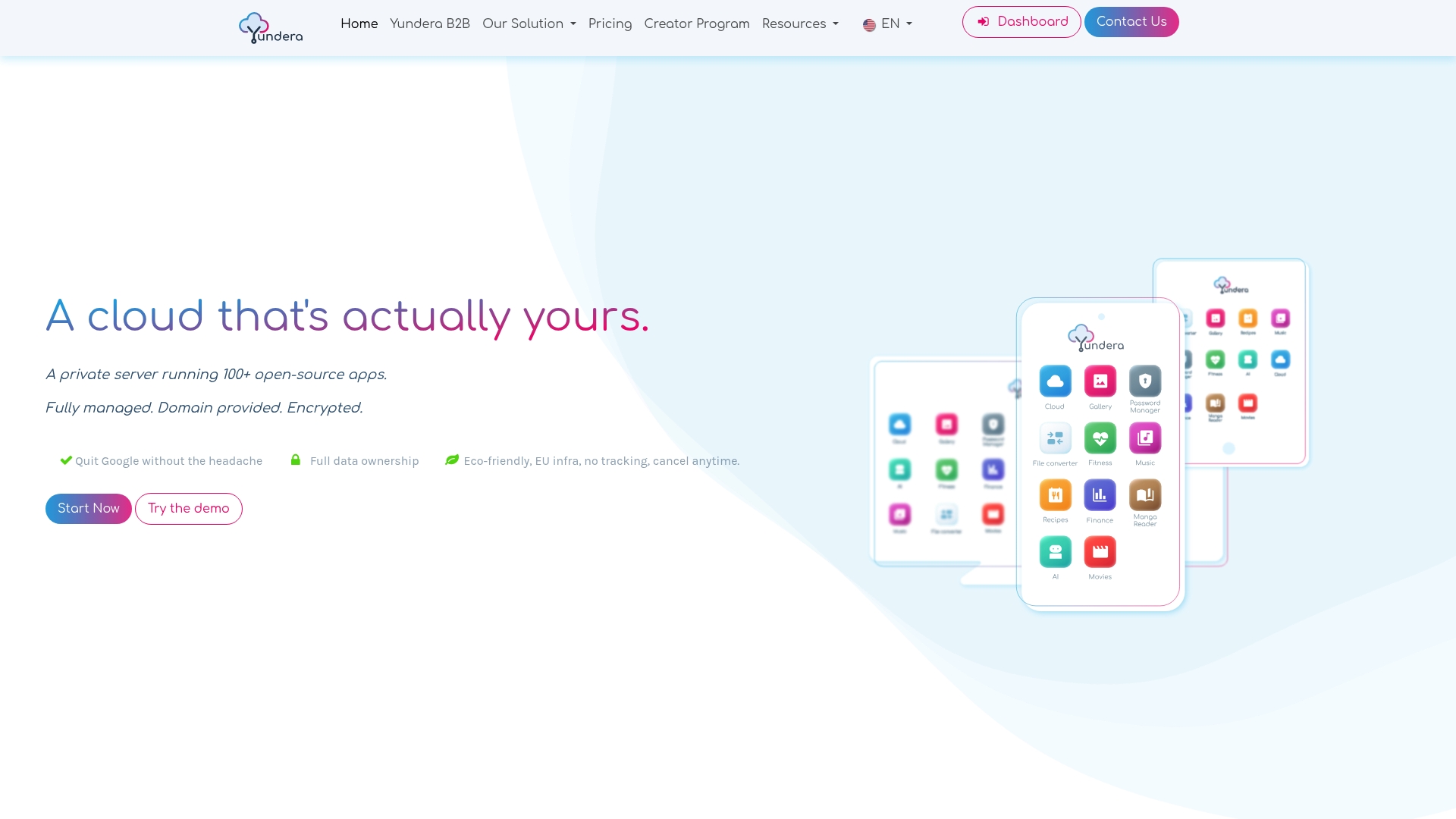
The server comes with ready-to-use open source apps for file storage, photos, website hosting, office work and more. You install them in one click from an app store. In practice:
- Access: each app is available over HTTPS on your own domain.
- Networking: you don't need a static IP, port forwarding or manual certificate management.
- Administration: Yundera manages the server, so you don't need any technical skills.
You still have to follow the good practices covered above. Your filing plan, retention periods, access rights and off-site copy under the 3-2-1 rule are still your responsibility. To compare plans and prices, see the Yundera private servers page.
The most common mistakes when going paperless
Most mistakes come from rushing through the legal requirements or not looking after the system once it's running. The most common ones are:
- Destroying paper too early: before checking the scanning rules set out in Article L102 B of the LPF.
- Losing the original: keeping only the OCR version, when the original file is the one that counts.
- Keeping data forever: the CNIL prohibits this for personal data.
- Mixing up roles: a DMS does not replace the certified e-invoicing platform.
- Using an unreliable host: a shared server, or a backup that has never been tested.
- Filing that's too complicated: a detailed plan that nobody follows day to day.
Before you go live, check four things. Retention periods are documented for every document type. Access rights are set by group. A 3-2-1 backup has been restored at least once. And you know how to run a full PDF/A export with the metadata.
— Yundera
Sources
- How long must businesses keep their documents? - Service-Public
- Electronic invoicing is coming soon! - Entreprendre.Service-Public
- Article L102 B - French Tax Procedures Code - Légifrance
- Data retention periods - CNIL
- How to reconcile retention periods and archives - CNIL
- paperless-ngx/paperless-ngx - GitHub
Frequently Asked Questions
What is the best free, open source DMS?
No single tool is best in every case, but Paperless-ngx is the simplest choice for a small organization. It's licensed under GPL-3.0, runs OCR with Tesseract, archives to PDF/A and files documents automatically. If you need approval workflows and fine-grained access rights, consider Mayan EDMS instead.
How long must a business keep its invoices?
Under the French Commercial Code, customer and supplier invoices must be kept for 10 years from the end of the financial year. The tax period is 6 years, but the longer period applies. You'll find the details on the Service-Public page.
Is a scanned invoice as valid as the paper original?
Article L102 B of the French Tax Procedures Code allows paper invoices to be kept electronically, provided you follow the scanning rules set by order of the minister responsible for the budget. Check that text before you destroy any originals, and always keep the raw scan file as well as the OCR version.
Does a DMS replace a certified e-invoicing platform?
No. Electronic invoices must go through a state-certified platform. All businesses have had to receive them this way since September 1, 2026, and SMEs will have to issue them this way from September 1, 2027. A DMS does a different job: it archives a copy of each invoice and lets you search all your archives.
Is Paperless-ngx a good fit for a small business or a freelancer?
Yes. It suits a small team well. It checks multiple mailboxes, learns from how you filed documents before to suggest tags, and stays easy to use every day. There is one important condition: its documents are stored without encryption, so it must run on a trusted server with a 3-2-1 backup.
Open Source DMS: Digitize and Archive Your Documents in 2026