Google Drive Alternatives: Which Sovereign Options Are There in 2026?

The best Google Drive alternative depends on how you use it, but three things always need checking: where your data is stored, which law applies to the provider, and how easily you can export your files. If you want to stay in control without managing infrastructure, an open source solution like Nextcloud on a private server hosted in France is often the best compromise. This guide covers the criteria to check, the main types of solutions, and a four-step migration method.
Key takeaways:
- A free Google account includes up to 15 GB shared across Gmail, Google Drive and Google Photos. Once that quota is full, you can no longer upload new files.
- In 2026, Google is testing a 5 GB limit for some new accounts created without a phone number. The terms of free storage can change without you having any say.
- Before choosing an alternative, check where the data is stored, which law applies to the provider and whether data leaves the EU. The CNIL considers these issues especially sensitive.
- Google Takeout exports your Drive as ZIP or TGZ archives. The download link expires after about seven days, so plan your migration before you start the export.
- Nextcloud is an open source alternative you can self-host. It offers desktop and mobile sync, version history and end-to-end encryption in the browser.
Table of Contents
- Why look for a Google Drive alternative?
- What should you check before choosing an alternative?
- Consumer cloud, European cloud or private server: what types of solutions are there?
- Is Nextcloud the best open source alternative to Google Drive?
- What happens to your Google Docs, Sheets and Slides when you leave?
- How do you migrate your files from Google Drive in 4 steps?
- Which Google Drive alternative suits a small business or a freelancer?
- How do you keep sync and mobile access after Google Drive?
- Yundera: a Google Drive alternative on your own server in France
- The most common mistakes when leaving Google Drive
- Sources
- Frequently Asked Questions
Why look for a Google Drive alternative?
People look for a Google Drive alternative because free storage is limited, and the rules are set by Google alone, which can change them at any time. Every Google account includes up to 15 GB shared across Gmail, Google Drive and Google Photos. That means your attachments, photos and documents all draw from the same pool.
When the quota is full, the effects go well beyond Drive:
- Drive blocked: you can no longer upload new files.
- Photos stops: backup of your phone's photos and videos is paused.
- Gmail disrupted: you may no longer be able to send or receive emails.
- Possible deletion: if you stay over quota for two years or more, Google may delete your content, with at least three months' notice.
The terms themselves can change too. In May 2026, Google confirmed it was testing a 5 GB limit for some new accounts created without a phone number in certain regions. Existing accounts are not affected for now. Still, the test shows that free storage is a business policy, not a commitment to you.
So this is not just about gigabytes. Your files depend on the rules of a company you do not control: quotas, access conditions, retention periods. Taking back control means choosing a service where you control the location, the rules and the way out.
Pro tip: check how your storage is split between Gmail, Drive and Photos before migrating. You will know how much data to move and which services to replace first.
What should you check before choosing an alternative?
Before choosing an alternative, check six things: where the data is stored, which law applies to the provider, transfers outside the EU, how easy it is to export, whether the software is open, and who controls the keys and access. The CNIL considers security, provider qualification, applicable law and data transfers to be especially sensitive issues. Its page dates from 2012 and is marked "being updated", but these questions are still relevant.
- Location: in which country, and in which data center, are your files stored? A vague answer is a red flag.
- Applicable law: where is the provider headquartered? Which jurisdiction does its contract name? Hosting in Europe is not enough if the company falls under foreign law.
- Transfers outside the EU: does the service use subcontractors outside the EU, for example for support or backups?
- Export: can you retrieve all your files in one go, in open formats and without loss?
- Open source: is the code public? If so, you can switch hosts without switching tools.
- Keys and access: who holds the encryption keys and the admin accounts? Who can technically read your files?
A service that answers these six questions clearly and in writing deserves your trust. If it stays vague, look elsewhere.
Pro tip: test the export during the trial period. If getting out is complicated from day one, expect a painful migration the day you want to leave.
Consumer cloud, European cloud or private server: what types of solutions are there?
Google Drive alternatives fall into three types: consumer cloud, shared European cloud and private server. What mainly sets them apart is how much control you keep over your files. The CNIL itself distinguishes between public, private and hybrid clouds, because they carry different risks.
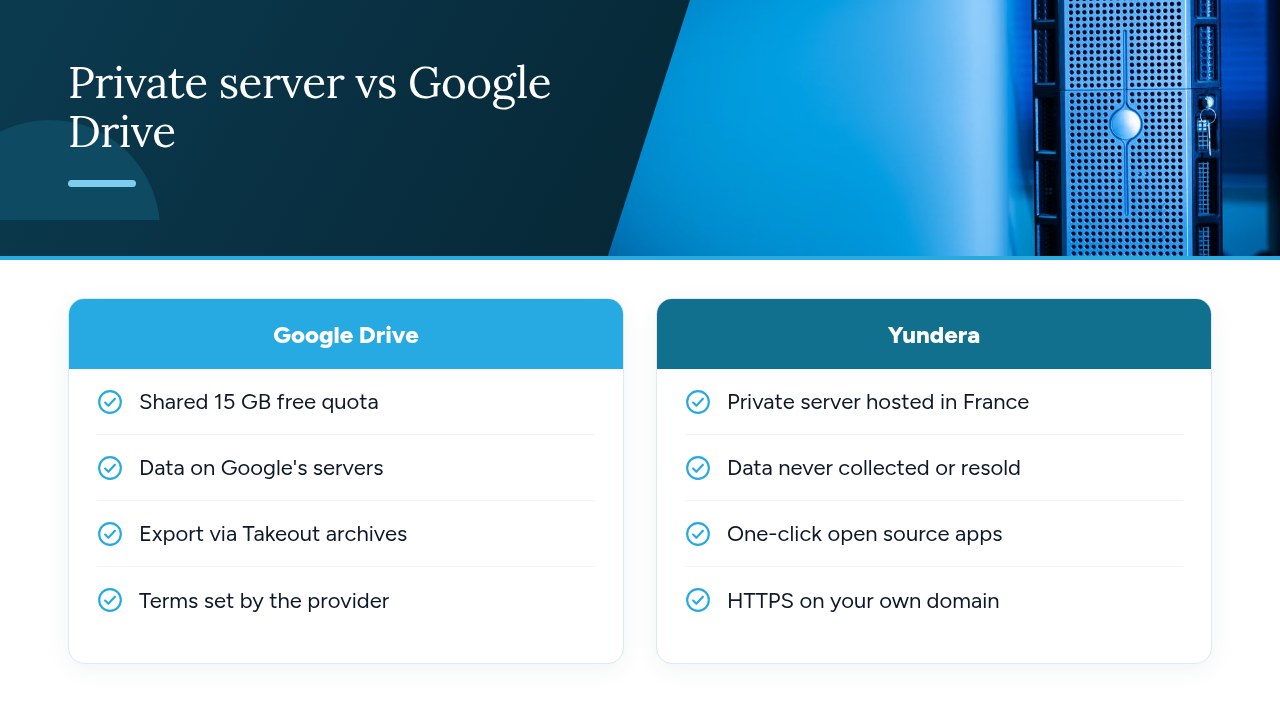
- Consumer cloud: American services such as Google Drive, OneDrive or Dropbox are very easy to use and well integrated with phones. However, the quota, access and applicable law depend entirely on the provider. They suit individuals storing files that are not very sensitive.
- Shared European cloud: data is hosted in the EU, often in France, and the provider falls under European law. Your files still sit on a platform shared with other customers, though, and you depend on its features and formats. It is a good step for a freelancer who wants an effortless solution.
- Open source private server: software like Nextcloud can be deployed on-premises, in the cloud or in a hybrid setup. The server is dedicated to you and you choose the apps. This gives you maximum control. The catch is operations: when self-hosting, updates, certificates and backups are your responsibility, unless a provider manages the server for you. This type suits small businesses, regulated professions and demanding individuals.
Pro tip: don't just choose a type of solution, choose an exit. With open source software, you can switch hosts without switching tools.
Is Nextcloud the best open source alternative to Google Drive?
If you want to replace Google Drive with open source software, Nextcloud is the most complete option, provided someone takes care of the server. Nextcloud Files describes itself as file storage and sharing software "with no data leaks to third parties and full control over your data". It can be deployed on-premises, in the cloud or in a hybrid setup, and its code is published on GitHub.
Its features cover most of what you expect from Drive:
- Sync: desktop and mobile clients keep your folders up to date across all your devices.
- Version history: you can restore an earlier version of a file after a mistake or an overwrite.
- End-to-end encryption: it works in the browser, for your most sensitive folders.
- Sharing: you share files with colleagues or outside contacts, from your own server.
To be honest about its limits, though: the software is free, but running it is not. When self-hosting, you have to apply security updates, renew HTTPS certificates, monitor disk space and set up external backups. If nobody handles these tasks, the server quickly becomes a risk rather than a protection. So the real question is not "Nextcloud or not?" but "who maintains the server?".
Pro tip: enable end-to-end encryption only on folders that really need it, and keep your recovery keys off the server.
What happens to your Google Docs, Sheets and Slides when you leave?
Your Google Docs, Sheets and Slides need to be converted before you leave. They are native Google formats, not standard office files, and they will not open as-is in another suite. Drive lets you save a file in a different format, such as PDF, Microsoft Word (.docx), PowerPoint (.pptx) or JPEG.
The format you choose determines what you can do with your documents afterwards:
- Editable formats: use
.docx,.xlsxand.pptx, or the open ODF formats (.odt,.ods,.odp). You will be able to keep working on your files. - PDF: keep it for archiving final versions. A PDF is easy to read but hard to edit.
- Images: JPEG works for a standalone visual, never for a working document.
Conversion is not always perfect. Spreadsheets with advanced formulas, comments, suggested edits and carefully designed layouts are the most fragile. Before switching, export a few representative documents and open them in the open source office suite you plan to use. Check the calculations, the page layout and that comments are still there.
Pro tip: list your ten most critical documents, such as your budget, quote templates and standard contracts. Test those first: if they convert cleanly, the rest almost always will.
How do you migrate your files from Google Drive in 4 steps?
Migrating from Google Drive takes four steps: inventory, export, import, then sharing. If you follow them in this order, you won't lose any files or access along the way.
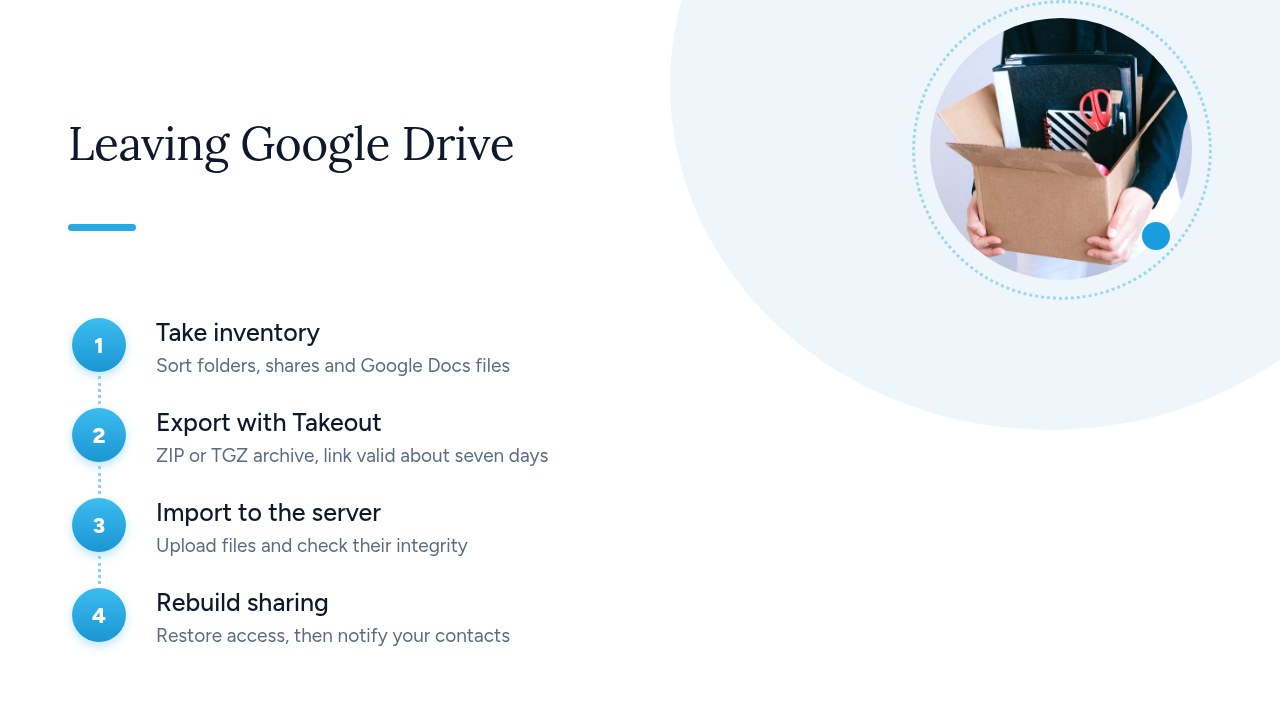
- Take inventory: list your main folders, the files shared with other people and the Google Docs, Sheets and Slides to convert. Note who has access to what, because you will need to recreate those permissions.
- Export with Google Takeout: select Drive and choose ZIP or TGZ archives. You also choose the archive size: Google recommends 50 GB to limit splitting. Preparation takes anywhere from a few minutes to several days. After that, the archive stays available for about seven days and can only be downloaded five times.
- Import to the server: extract the archives and upload the files to your new solution. Then compare the file count and total size with Drive to spot anything missing.
- Recreate sharing: restore access based on your inventory. Then let your colleagues and clients know that the old Drive links are no longer the reference.
Don't delete your Google account right away. Keep it for a few weeks and stop adding new files to it: it will serve as a safety net if a file turns out to be missing.
Pro tip: only start the Takeout export once the new solution is ready to receive the files. With a link valid for about seven days, every day you wait eats into your margin.
Which Google Drive alternative suits a small business or a freelancer?
For a small business or a freelancer, the right Google Drive alternative offers fine-grained permissions, controlled external sharing and a clear contract. At work, a badly shared or lost file costs far more than an exceeded quota.
- Team permissions: create groups (management, accounting, projects) and grant access per folder rather than person by person. When an employee leaves, a single action takes care of it.
- Controlled external sharing: require password-protected links with an expiry date for clients and partners. A public link with no time limit always ends up circulating.
- Version history: it lets you roll back after a mistake or an overwrite. Check how long versions are kept.
- Separate backup: a sharing service is not a backup. A deletion or ransomware spreads to every synced device. Keep a copy outside the service, on another medium or at another site.
- Contract and GDPR: add the service to your record of processing activities and read the provider's contract. The CNIL recommends framing the relationship with contractual clauses, especially on data location, security and reversibility.
A freelancer can get by with a well-backed-up personal space. A small business is better off with a dedicated server, so it stays in control of accounts and access.
Pro tip: once a quarter, review your active sharing links and delete the ones you no longer need.
How do you keep sync and mobile access after Google Drive?
Leaving Google Drive doesn't mean giving up sync or mobile access. A solution like Nextcloud offers desktop and mobile sync clients, plus a web interface. Day-to-day use feels much like Drive. The only difference is that your files now live on your server.
- On desktop: a synced folder works just like the Drive one. You work locally, and changes are pushed to the server automatically.
- On your phone: the mobile app gives you access to your files. Turn on automatic photo upload to replace Google Photos backup.
- In the browser: web access helps out on a computer that isn't yours, with nothing to install.
The key factor is remote access. Go for an address on your own domain name, over HTTPS with a valid certificate. Manually opening ports on your router or juggling a changing IP address exposes the server and breaks the connection the first time your network changes.
Two settings make a real difference day to day:
- Selective sync: on a laptop with a small drive, sync only your working folders and browse the rest online.
- Two-factor authentication: turn it on for every account. A stolen password is then no longer enough to reach your files.
Pro tip: after each new setup, test sync on your phone and on a second computer before deleting anything on the Google side.
Yundera: a Google Drive alternative on your own server in France
Yundera offers a middle path: a private server you control, without having to run it yourself. The Personal Cloud Server is a managed server, hosted in France and dedicated to a single customer. Ready-to-use open source apps install in one click from an app store: file storage, photos, office tools, website hosting and more. You get the same uses as Google Drive and Google Photos, on a server reserved for you.
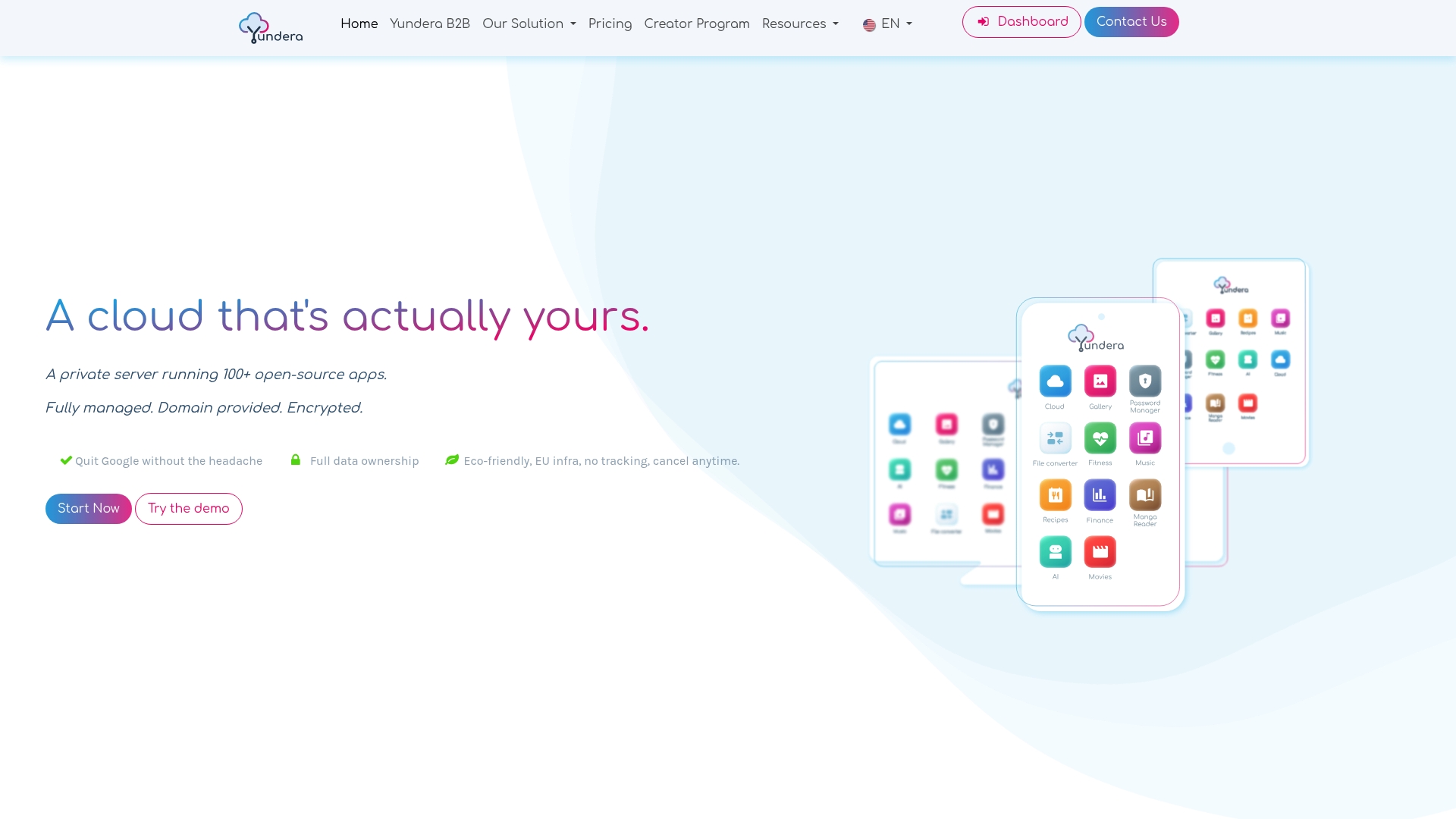
The two self-hosting hurdles described above disappear. Every app is reachable on your own domain over HTTPS, with no static IP, no port forwarding and no certificate to configure. No technical skills are needed, because Yundera manages the server. Your data stays on your server: Yundera does not collect or sell it. The four-step migration method applies as-is: you export with Takeout, then import your files into the storage app you installed. If you also use Dropbox, our guide to leaving Dropbox and migrating to a managed private server in France walks through the same process.
To compare plans and see the available apps, visit the Yundera private servers page.
The most common mistakes when leaving Google Drive
The most common mistakes come from rushing the migration. People start the Takeout export before the new solution is ready, even though the archive expires after about seven days. They forget to convert Google Docs to editable formats. They delete the Google account too early, don't recreate sharing, or confuse sync with backup. And they pick a service without checking where the data is stored or which law applies to the provider.
Before switching over, confirm these five points:
- Destination ready: the server is reachable and has enough space.
- Formats tested: your most critical documents open correctly.
- Access inventory: the list of shares to recreate is complete.
- External backup: a copy exists outside the service.
- Account kept: the Google account stays active for a few weeks.
— Yundera
Sources
- How your Google storage works - Google One Help
- How to download your Google data - Google Account Help
- Cloud computing: the CNIL's advice for businesses using these new services
- Gmail, Drive, Photos: Google adds a new condition for the 15 GB of free storage
- Files - Nextcloud
- Download a file - Computer - Google Drive Help
Frequently Asked Questions
What is the best free alternative to Google Drive?
Nextcloud is the most complete free alternative. It is open source software with desktop and mobile sync, version history and file sharing. The software costs nothing, but you need a server to install it on and someone to maintain it: updates, certificates and backups.
Is there a French alternative to Google Drive?
Yes. Several services host your files in France. Check where the data is stored, but also which law applies to the provider and that no data is transferred outside the EU. Yundera, for example, offers a managed private server hosted in France and dedicated to a single customer, with open source file storage apps you can install in one click.
How do I transfer all my Google Drive files to another cloud?
Use Google Takeout to export your Drive as ZIP or TGZ archives, then import the files into the new solution. Preparing the export can take anywhere from a few minutes to several days. The archive then expires after about seven days, so only start the export once the destination is ready.
Can Nextcloud replace Google Drive and Google Docs?
For file storage, sync and sharing, Nextcloud replaces Google Drive. For editing documents, you need to convert your Google Docs, Sheets and Slides to editable formats (docx, xlsx, pptx or ODF) and open them in an open source office suite. Test your most complex documents first.
Is my Google Drive data GDPR compliant?
Compliance doesn't depend on the tool alone. It also depends on how you use it, the contract you signed and the safeguards for data transfers outside the EU. The CNIL considers applicable law and data transfers in the cloud to be especially sensitive issues. A business should therefore add the service to its record of processing activities and check the provider's contractual clauses.
Google Drive Alternatives: Which Sovereign Options Are There in 2026?