Private Cloud Contacts: Keeping Ownership of Your Address Book

Yes, an address book can be hosted and synchronized on a managed private cloud while you keep full ownership and portability of the data. It is, in fact, the most reliable option for anyone who wants their contacts available on every device without depending on a tech giant that mines that information for other purposes.
That leaves one practical question: should you build the server yourself, or go with a managed service? It depends on your technical skills and on the level of guarantee you are looking for.
- You know how to administer a server, run backups and monitor access: lightweight self-hosting is still a realistic option.
- You want a reliable system without spending your weekends on it: a managed private server, with automatic backups, encryption and guaranteed export, solves the problem outright.
Yundera belongs to that second category, with ethical hosting in France and a guarantee that your data is neither collected nor resold.
Key Takeaways
A well-configured private cloud contact book combines CardDAV synchronization, encryption, versioned backups and GDPR compliance to guarantee full, lasting control over your data.
| Point | Details |
|---|---|
| Synchronization via CardDAV | The protocol uses CTag, ETag and sync-token so that only genuine changes travel between devices. |
| Synchronization ≠ backup | An accidental deletion spreads everywhere without versioning; test your restores regularly. |
| GDPR compliance is mandatory | Retention periods, legal basis and data subject rights must be defined before any migration. |
| Self-hosting vs. managed hosting | Self-hosting demands technical time; a managed service brings support and automatic backups. |
| Yundera as the managed option | Ethical hosting in France, guaranteed vCard export and migration support with no technical skills required. |
Table of Contents
- Why a private cloud contact book changes things for every profile
- How does contact synchronization work with CardDAV?
- What security and GDPR checklist should you use for an address book?
- Self-hosting or a managed private server: how to choose?
- Why Yundera stands behind a managed private cloud contact book
- How to get started with a managed private server for your contacts
- Sources
Why a private cloud contact book changes things for every profile
Centralizing your address book on a private cloud is not about comfort. It is about real control over information that most people leave scattered across three apps, an old email account and a SIM card.
Data sovereignty changes the balance of power in concrete terms: you know where your data lives, who can access it, and you can retrieve all of it at any time. No provider can resell or exploit what you have said you want to keep private.
Multi-device synchronization brings a second, often underestimated benefit: it mechanically reduces duplicates. Without a central server, every phone and computer becomes a diverging copy of the same address book, with numbers updated in one place and forgotten in another.
That cleanup has real economic value for freelancers and companies. A clean, up-to-date customer file gains value, whereas an outdated or scattered one loses its reliability, as Bpifrance points out in its guide to the customer file.
- An individual wants their contacts back after switching phones, without a Google or Apple account.
- A family shares a common address book (doctor, school, emergency numbers) available on every device in the household.
- A freelancer keeps a clean customer file that can be exported if they change tools.
- A company structures access so that each team sees only the contacts that concern it.
Pro tip: before migrating, sort through your existing contacts by hand. Merging duplicates before the import keeps you from recreating the same mess on your new server.
How does contact synchronization work with CardDAV?
CardDAV is the protocol that makes it possible to synchronize your contacts across several devices without going through a proprietary third-party service. Each contact is stored in the vCard format, a readable text standard that holds names, phone numbers, addresses and notes.
What makes the protocol reliable are the change-detection mechanisms built into it. Three technical elements are worth understanding, even if you are not a developer:
- The CTag tells the client whether anything has changed in the address book as a whole, so it does not have to download everything each time.
- The ETag identifies the precise version of an individual contact entry, so only what has actually changed gets synchronized.
- The sync-token enables incremental synchronization: the server returns only the changes made since the last pass.
These mechanisms are documented in detail in Google's CardDAV documentation, which remains a solid technical reference even outside its own ecosystem.
On the client side, DAVx⁵ has established itself as the standard entry point on Android for connecting a CardDAV address book to the phone's native contacts app. On desktop, Thunderbird and built-in mail clients also handle the protocol natively, with no complicated add-ons.
For a migration, vCard import and export remain the safest method: each contact becomes a .vcf file that any compatible server can read. You simply need to check beforehand that the client and the target server handle the same format, so that no fields are lost in transit.
What security and GDPR checklist should you use for an address book?
An address book contains personal data in the strictest sense: names, phone numbers, email addresses. In France, as everywhere in the European Union, that places the file under the GDPR, with specific obligations regarding retention periods, legal basis and the rights of the people concerned.
Before any migration or choice of host, several points deserve a systematic check:
- Retention period: set a clear rule (active contact, prospect, former customer) rather than keeping everything indefinitely.
- Legal basis: consent, contract or legitimate interest must be identifiable for every category of contact.
- Data subject rights: access, rectification and deletion must be handled without excessive delay.
- Encryption: data must be protected in transit (the connection) and at rest (storage on the server).
- Multi-factor authentication: it sharply limits the risk of unauthorized access, even if a password is compromised.
- Access logging: keeping a record of logins and exports makes audits and anomaly detection far easier.
The CNIL reference framework on managing commercial activities spells out these requirements precisely for customer and prospect files.
One technical point bears repeating: synchronization is not a backup. If a contact is deleted by mistake on one device, synchronization propagates that deletion everywhere, including on the server. Without versioning, the mistake becomes irreversible.
That is why backups need to be automated, encrypted and isolated from the main system, with regular restore tests to confirm that they really work, as the MDSI guide to centralizing contacts explains. Multi-level retention — days, weeks, months — with a restore tested every quarter remains the soundest practice.
One last, frequently neglected point: if you pass a contact file to a partner for prospecting, strict rules govern that transfer. Documenting consent at the moment of collection saves a great deal of trouble later on.
Self-hosting or a managed private server: how to choose?
There are two ways to host your address book outside the big tech platforms, and they do not call for the same investment.
Self-hosting with tools such as Nextcloud, Radicale or Baïkal gives you total control over the configuration. In return, it means handling updates, security and backups yourself, which takes time and genuine technical vigilance over the long run.
A managed private server changes that equation: support, automatic backups and service guarantees are taken care of, in exchange for a monthly subscription.
Four practical criteria are usually enough to choose between the two:
- Exportability: can you retrieve all of your data at any time, in a standard format?
- Encryption: is the data protected in transit and at rest, without complex manual configuration?
- Versioned backups: is there a history that lets you roll back after a mistake?
- Ethical hosting: does the provider guarantee that your data will never be resold or commercially exploited?
The migration itself follows a simple logic: map your existing contacts, clean up the duplicates, import via vCard, test synchronization on a pilot device, then train the other users before switching over completely.
Why Yundera stands behind a managed private cloud contact book
We believe an address book deserves the same rigor as a professional customer file, even when it is only used at home. That conviction shapes what Yundera offers: ethical hosting in France, guaranteed data export at any time, and more than 100 open-source applications you can deploy on the same private server.
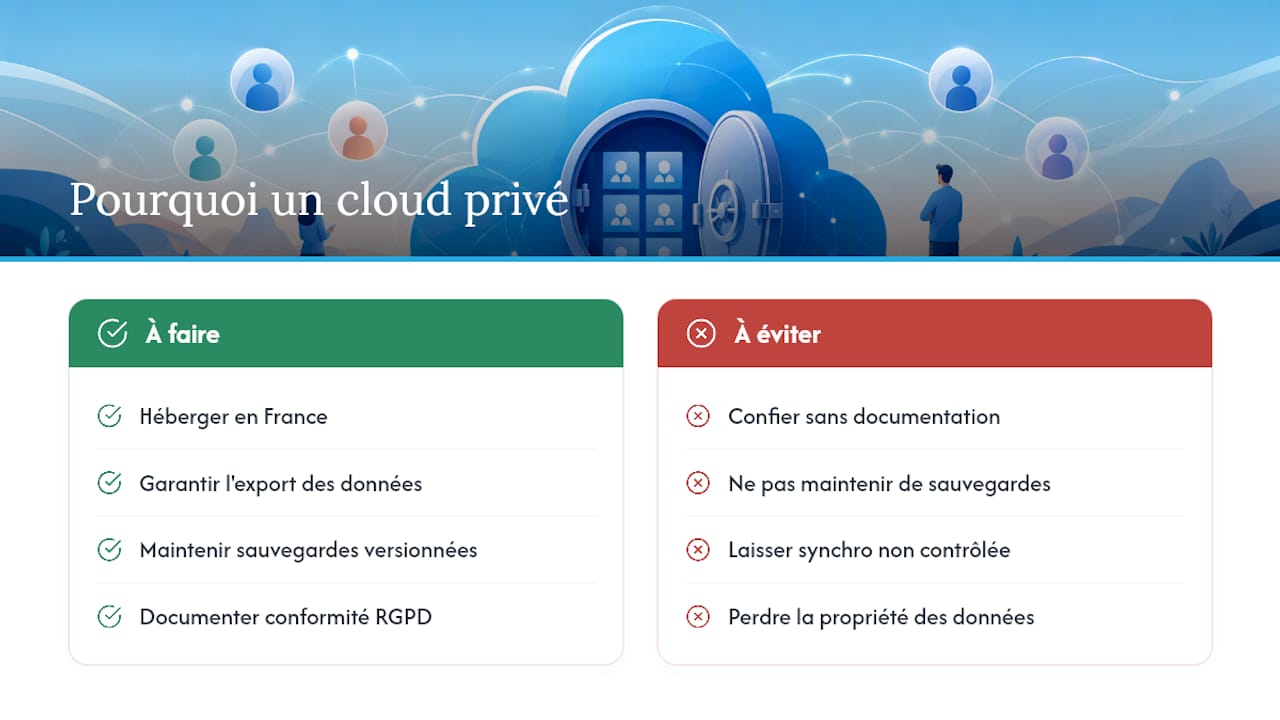
The difference shows up above all in the critical moments. An accidental contact deletion, a badly configured sync between two phones, a GDPR audit to prepare at short notice: those are exactly the situations where the absence of versioned backups or clear documentation gets expensive.
We document our GDPR compliance practices in the cloud so that every user, individual or business, understands exactly what real ownership of your data changes on a server you control. That documentation is anything but a side note: it determines how much trust you can place in any host, managed or not.
— Yundera
How to get started with a managed private server for your contacts
Yundera hosts your address book on a private server that genuinely belongs to you, without the usual trade-offs of self-hosting: versioned backups run automatically, vCard export stays available at any time, and our team supports the migration from your previous system.
Getting started takes three simple steps. First, a quick audit of your current contacts and your synchronization needs. Then the vCard import onto your server, with CardDAV configuration for your devices. Finally, guidance on connecting DAVx⁵ or your usual client, with support on hand if you get stuck.
For individuals concerned about the privacy of their personal data, the private server for individuals page details the available options. Freelancers and small businesses will find pricing information suited to them on the Yundera page for startups and SMEs. In both cases, getting set up requires no prior technical skills.
Sources
- Francenum
- Managing contacts with the CardDAV protocol (Google Developers)
- Businesses: how to centralize contacts safely - MDSI
- CNIL reference framework — managing commercial activities
Private Cloud Contacts: Keeping Ownership of Your Address Book